There are many apps on the Google Play Store that can automate most tasks on your Android phone. Whether you want to automatically adjust phone brightness to current light or Automatically turn on/off WiFi based on current location, there’s an app for that. There is even an app to tap on an app button at set intervals.
If you are interested in automating regular tasks on your phone, then I know just the right apps to get you started. Today I’ll share 5 of my favorite apps to automate Android functions.
1. Do It Later — Automatically schedule SMS, Emails, and Calls
Let’s start automating the most important task on the phone: communication. Do It Later is a free app to schedule your SMS, Gmail, Twitter status, and phone calls to automatically send later. You can set schedule frequency from hourly to up to annually, and receive a detail report of messages sent and delivered.
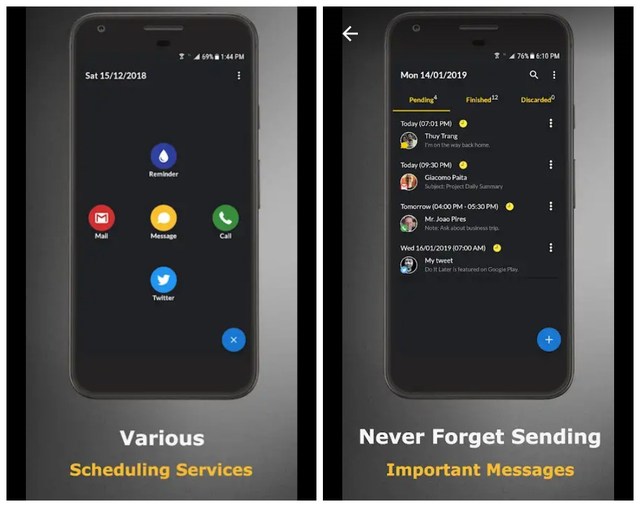
The app’s interface is also very simple and any novice can easily pick up and start scheduling messages. So far, the app hasn’t missed any schedule for me, but I will still recommend you to ensure Do It Later is whitelisted in your battery saver app.
2. WiFi Automatic — Automatically turn on/off WiFi
This app focuses on helping you save battery by ensuring WiFi is only turned on when needed. You can choose to turn on the WiFi only when you turn on the phone screen. Although this will prevent important messages from coming in when the screen is off, but if you are not expecting an important message then this is a very good way to save battery.

You can also turn on/off WiFi based on specific locations determined by cell tower. For example, you can turn on WiFi when you are at home or office, but keep it off while outside. Other then that, you can also allow the app to scan for nearby WiFi connections to connect and disable WiFi if no WiFi is available.
3. Tapping — Automatically tap anywhere on the screen
If any app or task requires you to constantly tap somewhere on the screen, then this app can do it for you. Tapping lets you specify places on the screen to tap and select the tap intervals. Once all set up, it will automatically tap on the defined places based on the intervals set.

The app only works on the app you want it to tap on, if the current app is closed then Tapping will stop working as well. Although do keep in mind that this app only works on Android 7+ devices.
4. Greenify — Automatically hibernate apps
Greenify automatically hibernate apps that are not in use but are still consuming battery and CPU power. It isn’t an app killer that kills every background app. It scans and finds misbehaving apps and only puts them in hibernate. You can also hibernate apps that haven’t been used for a while but are still open in the background.

The app is fully customizable and you can easily whitelist apps that you don’t want to hibernate. It also comes with two separate modes to hibernate apps according to your need. Overall, it’s a great app to keep your phone running smooth.
5. IFTTT — Connect apps to perform automatic functions
IFTTT lets you connect different apps together and perform automatic functions based on triggers. Basically, it lets you turn an event inside an app into a trigger to perform a different function in another app. For example, If you miss a call from someone, the system volume app can be triggered to increase volume to the maximum.

Depending on the need, you can create your own applets by choosing triggers and actions in different apps. Although, IFTTT also comes with hundreds of Applets that you can download and use for free. To get you started, check out our list of favorite IFTTT applets for Android.
Wrapping up
So these were some of my favorite apps to automate tasks on Android. IFTTT is hands down the best app for automating tasks on Android as it gives you full control over what you exactly want to automate. Although the other apps are quite useful as well if you need their features. You can also checkout Automate, which is similar to IFTTT but uses flowcharts to create triggers.
Let us know in the comments if you know any other cool apps to automate Android functions.
The post 5 Android Apps To Automate Android Functions appeared first on Gtricks.


via Gtricks https://ift.tt/2HfST3O

 Mozilla Thunderbird makes e-mailing safer, faster, and easier with features such as intelligent spam filters, a built-in RSS reader, and quick search. Thunderbird was designed to prevent viruses and to stop junk mail. Thunderbird includes tabbed e-mail, new search tools and indexing, smart folders, support for Firefox, a simplified s...


 doPDF allows you to freely convert documents to PDF files from any Windows application. It installs as a printer driver and helps you generate the PDF files by simply selecting the "print" command from any supported application. doPDF is a great solution for almost all applications that can print; you can convert your Word documents, Excel sheet...


 Splash is a free (Shareware) HD Video Player for PC specifically optimised and designed for HD playback. Splash 2.0, according to its creators, will let you enjoy your videos and media like never before, with smooth motion, crisp high details and vividly gorgeous colors. Well, we won’t make a judgement on that; beauty is after all in the eye...


.png) Wondershare Video Converter Ultimate is a very capable app for converting video files from one format to another. With it, you are also able to download, watch, transfer, edit and create all manner of video files from nearly any source you choose. The interface is easy to navigate; in only a matter of clicks you can begin to transfer and con...
Wondershare Video Converter Ultimate is a very capable app for converting video files from one format to another. With it, you are also able to download, watch, transfer, edit and create all manner of video files from nearly any source you choose. The interface is easy to navigate; in only a matter of clicks you can begin to transfer and con...


 5KPlayer is a free HD video player, music player, AirPlay media streamer and online video downloader rolled into one application. It can be used as a region-free DVD player to play ultra high definition videos with multi-subtitle tracks and soundtracks. It can also play YouTube videos, HD Camcorder movies, Blu-ray videos and play satellite radio...


 RogueKiller is an anti-malware application that has been written in C++. The application is able to detect and then remove generic malware and also some advanced threats like rootkits and worms. RogueKiller can find malware by using a number of different techniques such as heuristics and signature finding. Key Features Include: Kill mal...


 Your heart races; your face drops; tears start to well up in your eyes... "My phone!" you shout, "I’ve lost EVERYTHING!!" We’ve all been there and it’s horrible. But don’t worry – if you need to recover lost data from your iPhone, help is here – Aiseesoft Fonelab makes iPhone data recovery a piece of cake. Whether your iOS has been lost, bro...

