By default, Google Sheets automatically hides all the text that extends beyond the space of a cell. You can double-click on a cell to reveal all the content. However, for easier readability or printing purposes, you will have to reveal the text of the cells all the time. And this is where the text wrapping feature of Google Sheets will help you.
In this post, I am going to show you how you can wrap text in Google Sheets on your desktop and mobile phone.
Wrap text in Google Sheets for desktop
Wrapping text is really simple in the Google Sheets desktop version. Below you’ll find the step-by-step instructions:
1. To select the cells you would like to reveal, click and hold on the first cell and then drag to select all the required cells.

2. Afterward, click on the “Format” menu at the top and select “Wrap” from the “Text wrapping” option.

That’s it, all the content of the selected cells will be visible all the time and height of the columns will change.
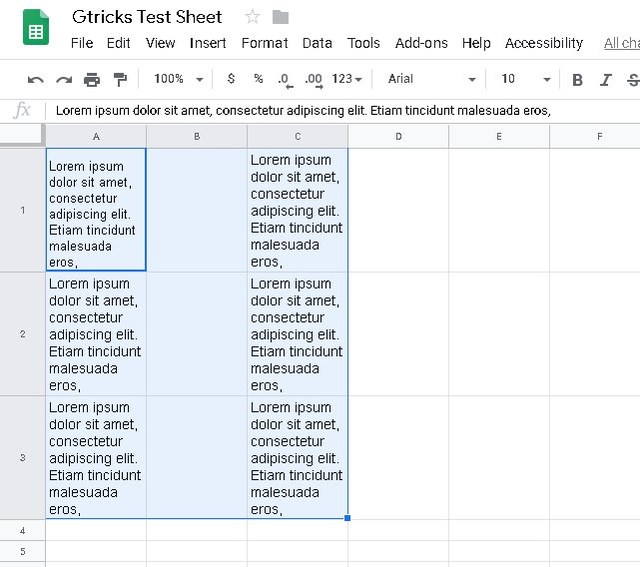
To switch back, just follow the same procedure and select “Overflow” or “Clip” option from the “Text wrapping” option.
Wrap text in Google Sheets for mobile
Same steps are required to wrap text in Google Sheets app for Android and iOS. For demonstration, I am using the Google Sheets Android app:
1. Tap on the first cell to select it. Afterward, tap and hold on it and drag to select all the required cells.
2. Now tap on the “Format” button at the top (the “A” icon).
3. Here move to the “Cell” section and enable the “Wrap text” option.
All the text inside the selected cells will be revealed.

Ending words
Do keep in mind that after wrapping text the height of the column will be significantly increased depending on the amount of text. This may cause problems while printing or representing data. Although the column width will stay the same, which is a good thing to fit page layouts.
Let us know in the comments if you have any questions.
The post How To Wrap Text in Google Sheets for Desktop and Mobile appeared first on Gtricks.

via Gtricks http://bit.ly/2UbmePB
 Visual Studio Code is a lightweight, yet powerful source code editor that runs from your desktop.* It comes with built-in support for JavaScript, TypeScript and Node.js and has a varied array of extensions available for other languages, including C++, C#, Python, and PHP. It is based around Github’s Electron, which is a cross-platform versio...


 This hugely popular streaming and recording software comes filled to the brim with customizations and features that makes live streaming a breeze. Add everything to your stream, from your videos and music to your webcam and remote guests from skype. Easily interact with friends and fans using features provided by XSplit, integrated chat, Twitch...


 ProgDVB is a useful tool, which allows you to watch SAT-TV and listen to digital radio channels directly from satellite by using DVB-PCI cards with hardware decoders on the board, SAT-dish, and personal x86-compatible computer. This app has options for working with network broadcasting and Audio or Video recording of the stream to different dig...


.png) Free YouTube Download is one of the most popular and well known YouTube downloader applications on the internet today. As the name would suggest, Free YouTube Download lets you download YouTube videos and convert and save them to your hard drive so you can watch them whenever you want. Older users may well recognise Free YouTube Downlo...
Free YouTube Download is one of the most popular and well known YouTube downloader applications on the internet today. As the name would suggest, Free YouTube Download lets you download YouTube videos and convert and save them to your hard drive so you can watch them whenever you want. Older users may well recognise Free YouTube Downlo...


 Zoom Player Max is a flexible and sophisticated media player for Windows. It is based on 'Smart Play' technology, which means you can playback more media files with improved stability, greater performance, and less fuss. Because it's easy to use, Zoom Player Max is suitable for every user level, but the advanced playback and customisation opt...


 doPDF allows you to freely convert documents to PDF files from any Windows application. It installs as a printer driver and helps you generate the PDF files by simply selecting the "print" command from any supported application. doPDF is a great solution for almost all applications that can print; you can convert your Word documents, Excel sheet...


