With many Android apps showing pop-up ads and even home screen ads, it’s no wonder users are looking to block ads on Android. However, blocking ads on Android isn’t as simple as installing an extension like on desktop. Google doesn’t allow network-level ad blockers on the Google Play Store and most outside ad blockers require a rooted device or complicating manual setups.
If you are having a hard time finding the right ad blocking solution for your Android phone, then maybe I can help. In this post, I am going to introduce a simple ad blocker for Android that only requires a single tap to work. Let’s get straight to it.
Introducing Blokada
The ad blocker I am talking about is Blokada, a completely free and open-source ad blocker. It’s a well-designed app that is small (less than 5mb) and light on system resources. All of its features work on non-rooted devices, and it blocks ads on both WiFi and mobile networks. Furthermore, it’s not limited to just blocking ads, it also blocks trackers and malware.
Overall, Blokada a simple ad blocker that does the perfect job of blocking all the ads without any complications. And as it’s open-source, you can be sure it’s free from malware or any other infections (here’s the source code).
Installing Blokada
Just like other ad blocking apps, Blokada is also not allowed to be listed on Google Play Store. You can download it from the Blokada website and sideload it. Just follow the below instructions to do so:
Go to your phone “Settings” and tap on “Security”.
Now scroll down and enable the option “Unknown sources”. This will allow you to install apps from other sources besides Google Play Store.
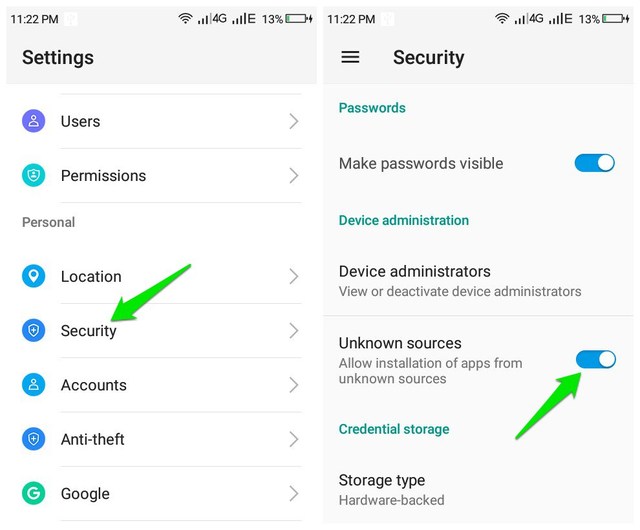
Afterward, go to Blokada website and download the latest APK file. You can also get it from F-Droid and XDA Labs.
The APK file must have downloaded in the “Downloads” folder. Just go there, open up the file, and tap on “Install” to install the app.

Using Blokada
Open the app and tap on “Continue” on the Terms and conditions and instructions pop-up (the instructions are worth reading though).
Now tap on the white “Power” button at the bottom and Blokada will start blocking all types of ads. In the below screenshot, you can see how it blocked ads on the SoundWire app.

Although a single tap is sufficient to block ads with Blokada, but it still comes with amazing customization options that are worth tweaking. Below I am going to explain some important options of Blokada:
Notifications: It’s enabled by default and will show a notification whenever Blokada blocks an ad. I will recommend you to disable it as it will show a notification every few seconds when it blocks an ad in the background. Enabling it allows you to see what type of address is blocked.
Blacklist: Lists all the servers that could be used to block ads. By default, it only uses the Energized Blu list which is enough to block all mobile ads. But you can enable other servers as well if you want more aggressive blocking.
Whitelist: Here you can add apps on which you don’t want to block ads. This already contains some Google apps on which the ads are not blocked. You can enable ads on these apps as well by unlisting them from the whitelist.
Advanced Settings: Although there are many settings to mess around with here, but you particularly may like to enable “Keep alive” and “Aggressive wakeup” options. These options prevent your phone’s battery saver feature from disabling Blokada or limiting its features.
Ending words
I have tried many Android ad blockers before, including AdGuard and Adblock Plus. However, most of them are either limited to the browser or require complicating manually setups and management. Blokada is definitely a reliable ad blocker for Android that is easy to use and manage.
Do let us know in the comments if you have any questions or suggestions.
The post Easiest Way To Block All the Ads on Android (Apps and Browser ads) appeared first on Gtricks.

via Gtricks http://bit.ly/2ICRWEd
 Total HTML Converter is a useful little app that can batch convert HTML files to DOC, PDF, HTML, XHTML, TXT, XLS, RTF, TIFF, JPEG, PNG, ODT, EMF, or SVG file formats. The app is not limited to HTML only as the input file though, it also supports MHT, HTM, and XHTML. All this can done through a standard explorer style user interface or via the com...


 LastPass is an award-winning password manager that can save your passwords and provide you with secure access from every computer and mobile device you have. With LastPass you need only remember one password - your LastPass master password. With the LastPass: Free Password Manager extension for Chrome, you can save all your usernames and passwor...


 TuneFab Apple Music Converter is a great app. It’s the kind of app that Apple probably wishes didn’t exist. But it does. And that’s great news for everyone. It also scores highly across the web in terms of reviews and user satisfaction. As anyone who has ever used Apple music and iTunes knows, Apple Music tracks are encrypted Digital Rights ...


 Snes9x is a portable, freeware Super Nintendo Entertainment System (SNES) emulator. The application can allow you to play most games that were designed for the SNES and Super Famicom Nintendo game systems on your PC. If you are unaware, SNES was a 16-bit video game console which sold 50 million units globally and was immense fun to play games on! ...


 Mozilla Firefox is a fast, light and tidy open source web browser. At its public launch in 2004 Mozilla Firefox was the first browser to challenge Microsoft Internet Explorer’s dominance. Since then, Mozilla Firefox has consistently featured in the top 3 most popular browsers globally. The key features that have made Mozilla Firefox so popular are ...


 Switch Audio File Converter allows you to convert common file types to a very comprehensive variety of audio output formats including: WAV, MP3, WMA, M4A, OGG, AVI, MID, FLAC, MOV, AMR, AAC, AU, AIF, RAW, DVF, VOX, CDA, GSM, DSS, WMV. KEY FEATURES INCLUDE: Universal audio converter supports all popular formats. Convert or compress sound fil...


 Quip has been specifically designed to help you work better. It combines chat, docs, task lists, and spreadsheets in one application thereby making collaboration both fast and easy. Quip enables you to create and share docs from any device you choose, whether that be a mobile device running iOS or Android, or your desktop PC or Mac. Quip has...

