Screenshots are an essential part of our digital lives, whether you need to fix a problem, capture a conversation or show off your video gaming skills. All Android devices have a native screenshot function. It usually includes holding down a couple of phone’s hardware keys at the same time. The button combinations vary from device to device. However, the most common way to take a screenshot is to press and hold the volume down and the power button simultaneously.
It’s not always obvious just how to pull off a screenshot though, especially when they’re blocked by default on the host app. If you are dealing with an app that restricts screenshots, then I have just the solution for you. In this post, I’ll show you how to screenshot of restricted apps on Android without rooting your device.
Use Google Assistant to take a screenshot in restricted apps
I will be using Google assistance for this purpose, specifically using its “What’s on my screen?” feature. Although this feature is made to learn more about things on your screen, but in the process, it also takes a screenshot while reading the data – which isn’t blocked by restricted apps. Let’s see how to use it:
Press and hold the Home button and it will open a screen. Click on the Navigation button on the bottom left corner of the screen.
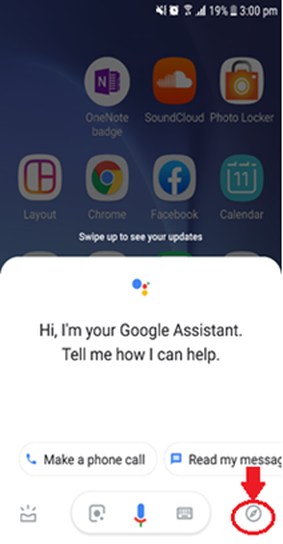
Now click on the Profile button located on the top right corner of the screen and select Settings from the menu. Here you will click on the Assistant tab which is located on the top bar.

Scroll down to the end of the screen and tap on Phone. After the screen appears, scroll down to the bottom of the screen, here you will notice a toggle button Use screen context you need to switch on this.

Then go back to the application of which you want to take a screenshot, again press and hold the Home button and then click on Share Screenshot which will allow you to share your screenshot with your social media platforms or you can save it to Photos.
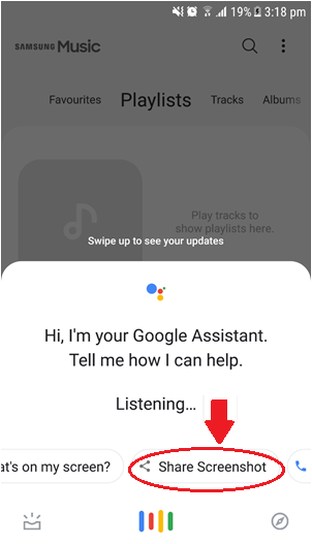
So this is how you can easily take screenshots of the applications which don’t allow the users to take screenshots.
Conclusion
Screenshots are usually blocked by apps with security risks, such as your banking app. Although it’s good for security reasons, but it can be annoying when you really need to take a screenshot, for example, to show a transaction’s details. But thanks to Google Assistant for providing a trick using which you can easily take screenshots of the applications with restrictions.
If you have any questions, let us know in the comments below.
The post Easy Way To Take Screenshots in Restricted Android Apps appeared first on Gtricks.


via Gtricks http://bit.ly/2F5G5Lg


 VirtualDJ (VDJ) is a feature-packed deejaying software for mixing and playing digital audio and video tracks. The UI resembles a classic DJ setup with a mixer and two turntables but can be expanded to 4 decks or more. It’s vinyl emulation feature allows to control music files on the computer through physical turntables which makes the mixing and sc...


 Driver Talent (formerly DriveTheLife) is an easy to use application that has been designed to help you get the drivers you need for your system. It allows you to download and install driver updates, backup and restore drivers and uninstall/remove unused hardware drivers for all users of your system. Sporting a fresh new look and design, Driver T...


 IPVanish offers a top-tier VPN service with private connections and fast speeds, giving you more freedom online. It provides a secure environment for your everyday web use to keep your online activity and information private, protect against threats, and avoid censorship restrictions. With IPVanish VPN, you get fast VPN speeds, secure connect...


 NTLite Free 64-bit is an app for Windows administrators that allows you to edit Windows installation images, either 'offline' or 'live'. The 'live' edit mode is a unique feature that lets you modify already installed Windows OS' without re-installation. All you have to do is run the tool on the OS you want to edit, change what you need and reboot ...


 NTLite Free 32-bit is an app for Windows administrators that allows you to edit Windows installation images, either 'offline' or 'live'. The 'live' edit mode is a unique feature that lets you modify already installed Windows OS' without re-installation. All you have to do is run the tool on the OS you want to edit, change what you need and reboot ...


 Google’s game changing web browser Chrome combines sophisticated technology with a simple UI, to create a faster, safer and easier browsing experience. Launched in 2008, Google Chrome quickly dominated the web browser market to become the most used web browser globally within 4 years of its public release. Google’s rapid and continuous development ...


 Online privacy and data protection is hot-topic in today’s media, and for good reason. Stories of data breaches and misuse and becoming more and more common. This is why it’s important to ensure that your personal data remains safe and secure. ZoogVPN provides software that secures your web communications and protects against eavesdropping by co...

