By default, a new document in Google Docs has a dedicated space at the top to enter the header details. Although the header is needed for long documents, but most regular documents don’t require header details. However, you’ll still have this big white space at the top of every document and every page inside that document.
If you are interested in removing the header in a Google Docs document — like for printing may be — then it’s not that easy. There are no dedicated options to delete header in Google Docs, but there are a few workarounds. Today, I’ll show you 2 ways to get rid of header in Google Docs.
Adjust header and page margins to remove the header
Technically, this solution doesn’t actually remove the header in your Google Docs document. However, you can essentially remove the white space at the top of each page, which serves the same purpose in most cases.
What you need to do is remove the top page and header margins to remove the white space at the top. This will keep the header option available at the top, but the white space will be removed.
Here’s how to do it:
Double-click on the header section (the white space) at the top and click on the “Options” button.
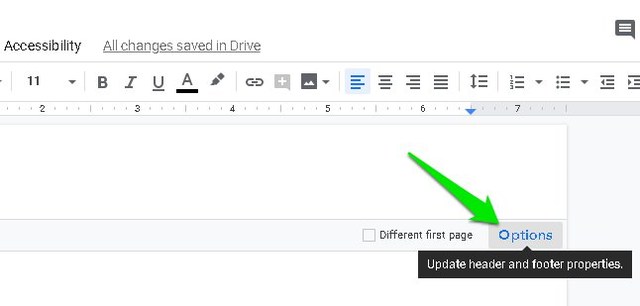
Here enter “0” (zero) in the text box next to “Header” and then click on “Apply”.

To remove the page margins, click on the “File” menu at the top-left corner and select the “Page setup” option.

Now under the “Margins” section, enter “0” (zero) in the text box next to “Top” and click on “OK”.

This will remove both header and page margins and you’ll see that white space is removed from the top. Although a single line of space will remain on which you can click to enter header details.

Remove header in Google Docs with a third-party add-on
If you want to completely remove the header along with the single line of white space, then that is also possible with a custom script. Adding and using a custom script can be a little difficult, but thankfully, there is a Google Docs add-on available as well that makes things much simpler. Although if you are interested in manually installing the script instead, you’ll find it in this Stack Exchange discussion.
The add-on I am talking about is Documents by Top Contributors, which lets you remove both header and footer in any Google Docs document. Just click on the install button and provide the required account permissions to install the add-on. Once installed, go to Add-ons > Documents by Top Contributors > Remove header / footer and click on “Remove header”.

This will remove the header from your Google Docs document. You will notice that even the single line of white space is removed and clicking anywhere on the top will not reveal the header section.

Warning: After removing header with this add-on (or script) you will not be able to bring it back for that specific document. Make sure you want to permanently remove the header from this document before using this method, otherwise you’ll have to move the document’s content to a different document.
Ending thoughts
I believe the first method is much safer and easier to follow if you just want to remove the top white space that the header is taking. However, if you want to completely remove the header from your document, then you must use the dedicated script/add-on. Let us know in the comments if you know any other way to remove header in Google Docs.
The post 2 Easy Ways To Remove Header in Google Docs appeared first on Gtricks.

via Gtricks http://bit.ly/2EhRzLU
 Ron's Editor is a powerful CSV file editor. It can open any format of separated text, including the standard comma and tab separated files (CSV and TSV), and allows total control over their content and structure. It's been labelled the 'Ultimate CSV Editor' because of the numerous editing options, coupled with the power and speed necessary to handl...


.png) A complete disaster recovery solution for your home and office. Protect your personal documents, photos, music and emails. Upgrade your hard disk or try new operating systems in the safe knowledge that everything is securely saved in an easily recovered backup file. Don't compromise your data integrity with second best Macrium Reflect uses l...
A complete disaster recovery solution for your home and office. Protect your personal documents, photos, music and emails. Upgrade your hard disk or try new operating systems in the safe knowledge that everything is securely saved in an easily recovered backup file. Don't compromise your data integrity with second best Macrium Reflect uses l...


 Gilisoft Private Disk is a simple, yet powerful virtual disk encryption app, which can protect sensitive, personal data by encrypting it in files held on virtual disks. The advantage of saving files and folders on private, virtual disks is they are easily created and secured with the use of passwords. Virtual disks can also be managed in muc...

