Read the full article at AskVG.com

via AskVG https://ift.tt/2UlHYeA


Show Multiple Examples in OpenAPI – OpenAPI (aka Swagger) Specifications has become a defecto standard for documenting and sharing REST API. When using OpenAPI it is always best practice to add as much detail as we can. The API specification should be built from the API consumers perspective. The DX or developer experience is important when developing the API.
To improve the API experience we must define attributes with descriptions and example. It is also possible to define multiple examples to show different way the API can be consumed / requested.
First, let us see how swagger editor (editor.swagger.io) shows multiple examples. The examples are shown in a dropdown where user can choose and see appropriate request payload. sample1 and sample2 are two examples for Pet store API.
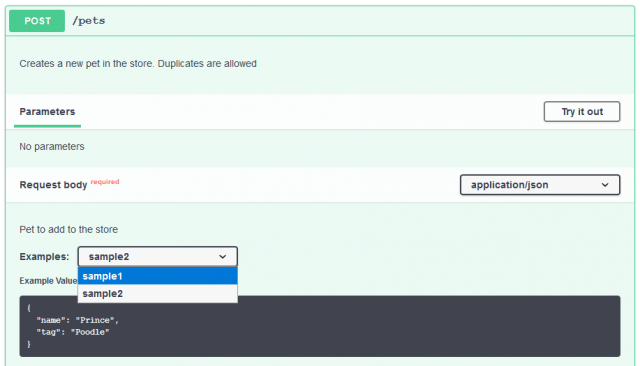
To add multiple examples in OpenAPI, we can define examples attribute as shown below. Notice how we defined sample1 and sample2. You can give any meaningful name relevant to your API.
openapi.yaml
paths: /pets: post: description: Creates a new pet in the store. Duplicates are allowed operationId: addPet requestBody: description: Pet to add to the store required: true content: application/json: schema: $ref: '#/components/schemas/NewPet' examples: sample1: value: name: Cupcake tag: Chihuahua sample2: value: name: Prince tag: PoodleIn OpenAPI, we can also provide example at attribute level. While it is good to define an attribute example (e.g. petType) so the consumer of API know what to pass or what to expect from attribute. However it is also a good idea to provide example at broader request/response level.
The request/response level example would provide much broader context to API consumer and also helps documenting API better. Furthermore many mock tools can generate mock responses from the examples provided in Swagger file.
The multiple example works with both API Request and Response. Similar to what we did above, the same can be specified for API Response. In below screenshot we can see how swagger editor shows multiple response example.
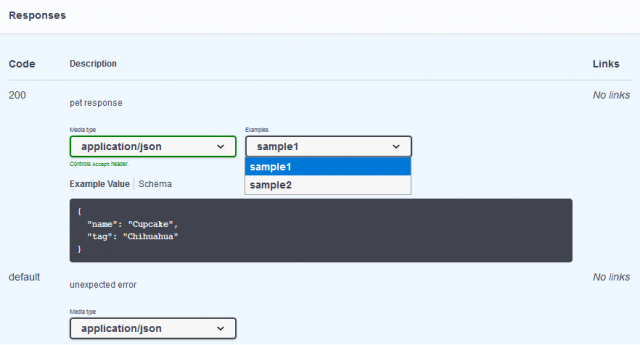
openapi.yaml with examples in response
paths: /pets: get: description: Returns all pets operationId: findPets parameters: - name: tags in: query description: tags to filter by required: false style: form schema: type: array items: type: string - name: limit in: query description: maximum number of results to return required: false schema: type: integer format: int32 responses: '200': description: pet response content: application/json: schema: type: array items: $ref: '#/components/schemas/Pet' examples: sample1: value: name: Cupcake tag: Chihuahua sample2: value: name: Prince tag: Poodle default: description: unexpected error content: application/json: schema: $ref: '#/components/schemas/Error'Hope this little trick will make your API documentation awesome :-)
https://swagger.io/docs/specification/adding-examples/


