If you are like me, your Gmail account is probably filled with thousands of unwanted messages begging to be deleted. And the situation gets worse if you have merged multiple Gmail accounts.
After every few months, I have to do some spring cleaning to keep my Gmail account clutter free. Honestly, it’s a rather difficult job. You simply can’t risk deleting important emails, and going through each email when there are over ten thousand emails is unpractical.
If you are dealing with a cluttered Gmail account, then I can help make things a little easier for you. Below I have listed 3 easy ways to bulk delete emails in Gmail without too much effort.
Use search operators to bulk delete specific emails
Let’s start with a safer option that might require a few minutes of learning, but ultimately, you’ll be able to safely delete thousands of unwanted emails with just a few clicks. The search bar at the top of your Gmail account is very smart. There are dedicated search operators for Gmail that will allow you to search for specific type of emails and delete them.
For example, you can search emails by size to delete emails with big attachments, or you can search for old emails and delete them.
There are dozens of Gmail search operators, and lucky for you we have a list of all the Gmail search operators along with examples. Just check the list and you will surely be able to find an operator to find the emails you want to delete. If you don’t find the right operator, you can also let us know in the comments and we will help.
To delete the emails you have searched for, click on the “Select” button in the top toolbar. This will only select emails on the current page. To select all the emails, click on the “Select all conversations that match this search” button that comes up after clicking the “Select” button.
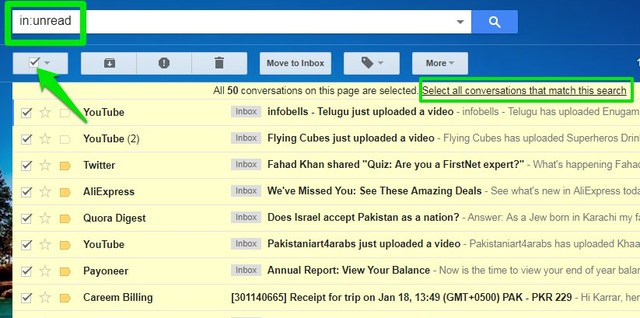
Once all the items are selected, click on the “Delete” button in the top toolbar.

Bulk delete Gmail emails under labels
You can also delete emails under a specific label. For example, if you don’t find the social emails to be of use, then you can simply go to the Social section of the inbox and delete all the emails there.

The deletion process is same as above. You just go to the label you want to completely wipe and select all of the emails there (check the instructions above). Click on the “Delete” button and the emails will be deleted.
Bulk delete all emails in Gmail
This is a nuclear option and I won’t recommend it. However, if you just want to start over and get rid of everything in your Gmail account, it’s rather easy. Gmail has an “All Mail` label that lists all the emails in your Gmail account, including Inbox, Sent items, Drafts and other labels.
In the left-hand panel, click on the “More” button and you’ll some more labels.

You’ll find the “All Mail” label there. Open it up and then delete all the emails like we did in the above two methods.

Note: All the deleted emails go into the “Trash” label. Here they can be either recovered or get permanently deleted automatically after 30 days. You should also delete emails from Trash if you don’t plan to recover them. And if you accidentally deleted an important email, there is still a chance you may be able to recover the email.
Conclusion
I always use the Gmail search operators to delete unwanted emails, and so far, I haven’t faced any problems. You should stick to the search operators if you don’t want to delete something important. And if possible, try quickly reviewing the emails before deleting them. Do let us know in the comments if you managed to declutter your Gmail account.
The post How To Bulk Delete Gmail Emails – 3 Easy Ways appeared first on Google Tricks Blog.
via Gtricks http://ift.tt/2mUWg51

 FrostWire, a BitTorrent client (formerly a Gnutella client), is a collaborative effort from many Open Source and freelance developers located from all around the world. Using the most recent version of FrostWire allows users to enjoy the best program functionality. Bugs reported in older versions have been fixed for the latest version. Any users w...


 Soft4Boost Suite is a complete media application package that consists of the most useful tools Soft4Boost offers in an all-in-one solution. It includes system utilities, audio tools, video editing tools, image manipulation tool kits and burning software. Soft4Boost Suite is an extensive multimedia suite, which brings you a set of rich and...


 Soft4Boost Video Studio is a video editing package that has been designed to edit and produce home movies quickly and easily. With it you can join, split and delete unnecessary scenes, rotate video files, edit audio directly in the video, add audio background to video, insert titles, use cache video technology and edit your HD-recordings fast...


 Soft4Boost Video Converter is a powerful, feature rich application that is capable of converting both video and audio streams of video files from one format to another, and burn DVDs and Blu-ray discs. With Soft4Boost Video Converter you can convert video and music between almost any formats, including: AVI, WMV, MP4, MPEG, MKV, FLV, SWF, 3GP,...


 Soft4Boost TV Recorder is a standard, simple looking utility that allows you to watch and record TV to PC from any source, such as TV, satellite TV, DVB cards and digital cameras. Basically, it's a TV viewer with Personal Video Recorder functionality. It allows you to schedule TV recordings of all your favourite shows. You can record live T...


 Soft4Boost Split Movie is a video editing package that can easily and quickly cut unwanted scenes out of your movies without any need to re-encode the file. With it you can split and delete unnecessary scenes, edit audio directly in the video, and change scene sequence in MPEG, AVI, DVD, and Blu-ray formats. Key features include: Easy to use....

