Google Chrome automatically selects the default language of the browser based on your region and device settings. However, there is a chance it may not select your preferred language, especially if you are bilingual. If this has happened to you, don’t worry, you can change language in Google Chrome for both desktop and Android version.
The steps to change Chrome language is different for each device type, so below I have separately listed processes to change language in Chrome.
How to change language in Google Chrome for Desktop
Below are the instructions to change language in Google Chrome desktop version, follow along:
1. Click on the main menu (3 vertical dots) at the top-right corner and select “Settings”.

2. Scroll to the bottom and click on “Advanced”.
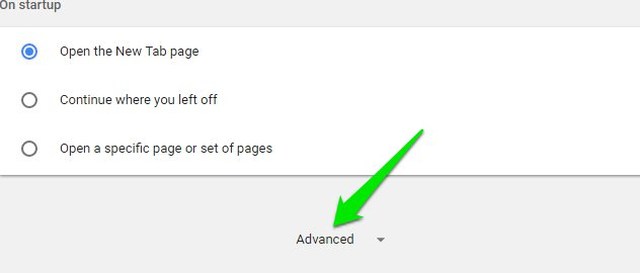
3. Click on “Language” under the “Languages” section.

4. Here click on “Add languages” if your preferred language isn’t already listed here.

5. Check the checkbox next to the language(s) you want to add and then click on “Add”.

6. Once the language is added, click on the menu (3 vertical dots) button next to it and select “Display Google Chrome in this language”. You can also select “Offer to translate pages to this language” if you want to translate unsupported web pages as well.

7. Click on “Relaunch” button next to the new language you added and the language will be applied.

Note: Chrome interface doesn’t support some of the languages, so the “Display Google Chrome in this language” option will be unavailable for them. Although you can still view the web pages in those languages.
Tip: If you don’t understand the currently selected language at all and the above instructions aren’t helping, then it’s better to reinstall Chrome instead. If the language is accidentally changed, then a reinstall will install Chrome in your preferred language.
How to change language in Google Chrome for Android
Unfortunately, Google Chrome for Android doesn’t have a built-in option yet to change languages on the go. However, Google is currently working to add language settings in Chrome for Android and it’s already available in the Chrome Canary. Furthermore, you can also change Chrome language by changing the default system language.
Below I have listed two ways to change language in Chrome for Android. You can use any one of them depending on your needs.
Method 1: Change default system language
As Chrome uses the default system language as its default language, you can change your phone’s language to force Chrome to use that language. I know changing the language of the whole system is a bit extreme, but currently, it’s the only official way. Here’s how to change system language:
1. Go to “Settings” and tap on “General Management” option.
2. Tap on the “Language and input” option and then tap on “Language”.
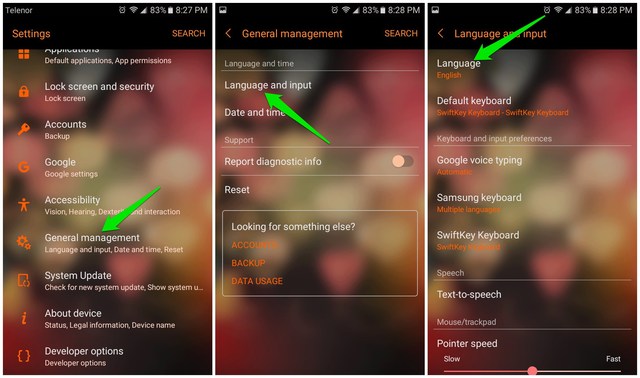
3. Select your preferred language from the list. Although the list would be rather limited depending on your phone’s supported languages.
4. Launch Google Chrome and you’ll see that its interface language is switched to your system’s language. Furthermore, Chrome will also show the web pages in your default system language (if available) or translate them to it.

Method 2: Use Chrome Canary to change language in Chrome for Android
Google Canary is an experimental version of Google Chrome where all the latest features of Chrome are available. It’s an experimental version, so you may find some bugs and issues while browsing the web. However, as it gets the latest features, it also supports that language settings feature that is supposed to reach official Chrome version soon.
If you can’t wait for language settings to arrive in the official Chrome version, then you can use Chrome Canary to use this feature right now. Here’s how:
1. Download Chrome Canary and launch it.
2. After the initial set up, tap on the menu button at the top-right corner and select “Settings”.
3. Now tap on “Languages” and then “Add languages” if the required language isn’t already listed.

4. From the list, select the language that you want to add.
5. Tap and hold on the added language to grab it, and then move it to the top of the list.
6. Afterwards, tap on the menu button next to the language and check “Offer to translate” option.
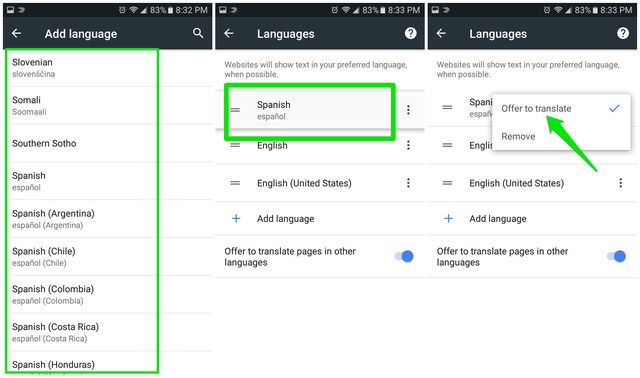
This will force websites to always show the page in your preferred language if available or Chrome will ask you to translate it. Unfortunately, this option can’t change the interface language of Chrome.
Note: Keep in mind that this is still an experimental feature and it may not work properly in some cases. Soon it will hit the official Chrome version and should work fine then. I’ll update this article when Google officially makes this option available.
Ending words
It’s really easy to change Google Chrome language on the desktop, but on Android your options are limited. I hope Google makes language change option available in regular Chrome soon, so you may not have to depend on the unstable Chrome Canary version. If you have any questions, feel free to comment below.
The post How To Change Language in Google Chrome for Desktop and Android appeared first on Google Tricks Blog.
via Gtricks http://ift.tt/2EXagWx
 dbForge Studio for MySQL is the universal MySQL and MariaDB front-end client for database management, administration and development. It provides utilities to compare, synchronize, and backup MySQL databases with scheduling, and gives possibility to analyze and report MySQL tables data. dbForge Studio for MySQL is able to work with any Mari...


 NoMachine is a free remote desktop application that has stacks of powerful features. With NoMachine you can access all your files and folders, Watch DVDs, the TV, or YouTube videos from wherever you are. You can view smooth, high-resolution video and audio from your PC or Mac to any NoMachine-enabled device. The application even works with...


 doPDF allows you to freely convert documents to PDF files from any Windows application. It installs as a printer driver and helps you generate the PDF files by simply selecting the "print" command from any supported application. doPDF is a great solution for almost all applications that can print; you can convert your Word documents, Excel sheet...


 GeoGebra is a free dynamic mathematics software tool for all levels of advanced education. The application combines geometry, algebra, spreadsheets, graphing, statistics and calculus and bundles them into one easy-to-use package. Users can use GeoGebra as a standalone product or they can also take advantage of other features including inte...


 mrViewer is a small, lightweight utility that can open images and play video files. It supports .BMP, .JPG, .PNG, .PSD, .MAP, .DPX, .MP4, .MPG, .MOV, .AVI, .DIVX, and .WMV file formats. With mrViewer you can add files by simply dragging and dropping them into the main panel or you can use the browse button to locate your media. It comes with...


 Task Scheduler Managed Wrapper provides a single assembly wrapper for the 1.0 and 2.0 versions of Microsoft's Task Scheduler. Task Scheduler is located in all Microsoft operating systems post Windows 98. This tool simplifies the coding, aggregates the multiple versions and allows for localization support. Main library core features include: ...

