Gmail automatically blocks some file types that can transmit viruses, including .exe. Even if you need to email a legit executable file, Gmail simply won’t allow you to attach it to the email. However, if you really need to send an exe file through Gmail, then there are some workarounds. In this post, I’ll share two easy ways to send executable files via Gmail.
Method 1: Send executable files in Gmail using Google Drive
I am going to start with the easiest option that is simple for both the sender and the receiver. The problem is that you’ll have to use an additional service to send the executable file. No worries though, we are still using a Google service and everything will be done inside the Gmail interface.
Here’s what you need to do:
1. Compose an email in Gmail and click on the “Insert files using Drive” button at the bottom.

2. Now move to the “Upload” section and click on “Select files from your computer” button to select the exe file on your PC (you can drag-and-drop as well).

3. Afterward, click on the “Upload” button below and the exe file will be added as a link in the email.
4. Click on the “Send” button and confirm the prompt. The exe file will be sent through Gmail.

Whether the receiver of the exe file is a Gmail user or not, they will be able to view and download the file without any problem.
Note: If the exe file is inside a folder, then the instructions to send it using Google Drive is a bit different. Check the second method in my article how to send a folder through Gmail to learn how to do that.
Method 2: Change the file extension to send the exe file via Gmail
I find the above method to be the easiest for both the sender and the receiver. However, if you don’t want to use it, then there is an alternative as well. You can fool Gmail into thinking that the file is not an executable file, and it will let you send it. Although, keep in mind that both sender and receiver will have to make some tweaks on their end to make this method work.
The below instructions are for Windows users. Similar instructions apply to Mac OS X and Linux users. All you need to know is how to change a file’s name in your particular OS.
1. Click on the exe file on your PC and press the F2 key to rename it.
2. Now remove the exe part from the very end and replace it with a different extension type, such as txt.

3. When prompted, click on the “Yes” button and the file extension will be changed. The new file name should be something like “filename.txt”.
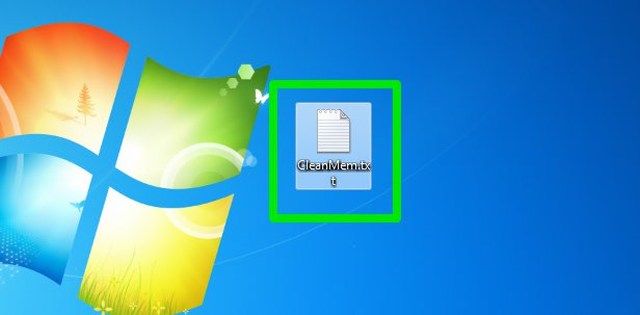
4. Now compose an email in Gmail and select the renamed file as an attachment. Gmail should have no problem attaching it, and you can safely send it.

The receiver can download the file as an attachment and rename the file back to exe similar to how you changed it to txt. This will make the file executable again without any errors or corruptions.
Note: If you can’t see the file extension while renaming the file, then it might be disabled in your OS. Here’s how to enable file extensions in Windows and Mac OS X.
Ending words
The first method should be your go-to choice if you don’t want to create any confusions for the receiver of the exe file. Additionally, the first method also lets you send large files up to 10GB. Of course, if you don’t want to upload a file to your Google Drive, then the second method will surely work for you.
If you have any questions or know any other way to send exe files through Gmail, let us know in the comments below.
The post 2 Simple Methods To Send Executable (exe) Files Through Gmail appeared first on Gtricks.
via Gtricks https://ift.tt/2IqAn65

.png) AnyBurn is a free, lightweight and professional CD/DVD/Blu-ray app that supports Audio, Video and ISO file ripping and burning. With AnyBurn creating disc images and multimedia compilations, or bootable media with CD, DVD and Blu-ray optical discs, is easy. The app is lightweight, easy to use and has a simple interface that can be navigated ...
AnyBurn is a free, lightweight and professional CD/DVD/Blu-ray app that supports Audio, Video and ISO file ripping and burning. With AnyBurn creating disc images and multimedia compilations, or bootable media with CD, DVD and Blu-ray optical discs, is easy. The app is lightweight, easy to use and has a simple interface that can be navigated ...


 Sometimes you Windows installation can become corrupted due to a poorly installed apps or Malware, which can modify your settings resulting in your system becoming unstable and unusable. With Tweaking.com Windows Repair you can restore the original Windows operating system’s settings and fix numerous instabilities and problems. Tweaking.com ...


 Privacy Eraser Free has been designed to help you achieve the most secure digital life that you can, by cleaning not only your Internet history and downloads, but also wiping your drives clean and deleting your data beyond recovery. Key Features include: Schedule scans. Multi-user support. Intuitive interface. Rapid scanning tools. Sec...


 The Hola extension for Chrome is an ad-free VPN proxy service, which gives you a faster and more open Internet. With Hola installed you can access websites that are blocked or censored in your country. The Hola browser extension helps you become invisible whilst browsing the web and also provides you with access to restricted resources, Hola can...


 Total Image Converter is a really useful little utility that can convert your images to other formats. It is also able to undertake a number of different editing techniques such as crop, resize and rotate. Total Image Converter lets you convert large TIFFs into small JPEGs, make photos suitable for the web or recover old photos in unsuppo...


