Google Calendar lets you share your calendar with others while still having full control over what information should be shared. If you want your friends, family, or coworkers to track your availability, then sharing your Google Calendar is an easy way.
If you are a having trouble finding out how to share your Google Calendar — especially after the UI upgrade — then I got your back. Today, I’ll show you how to share Google Calendar with other Google account users and non-Google account users.
Note: You can’t share your Google Calendar from the iOS or Android app. You’ll have to use the Google Calendar web application.
Share Google Calendar with Google account users
There is a different sharing process depending on whether the receiver has a Google account or not. If the other user has a Google account, then you can individually share the calendar with them using their Gmail address. Here’s how you can share Google Calendar with someone with a Google account:
1. Open up Google Calendar and move to the “My Calendars” section in the left panel.
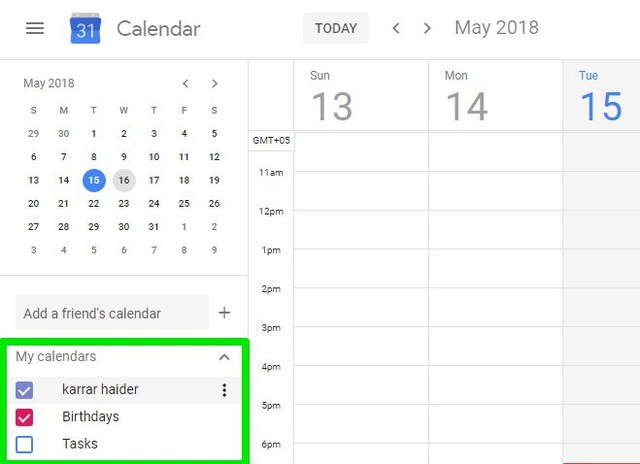
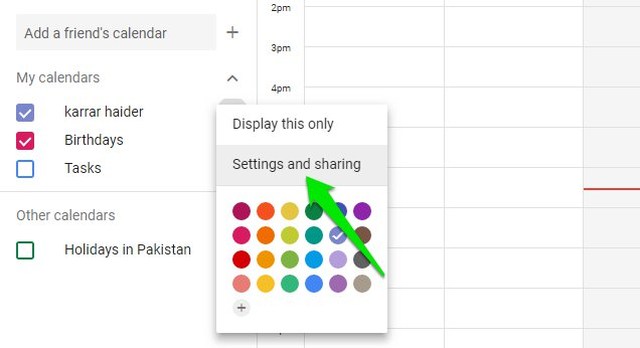
2. Here click on the three vertical dots menu next to the calendar you want to share and select “Settings and sharing” from it.
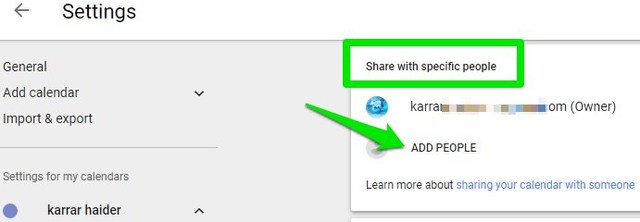
3. Now move to the “Share with specific people” section and click on “Add People”.
4. In the above field enter the email address of the person you want to share the calendar with (multiple emails can be added).
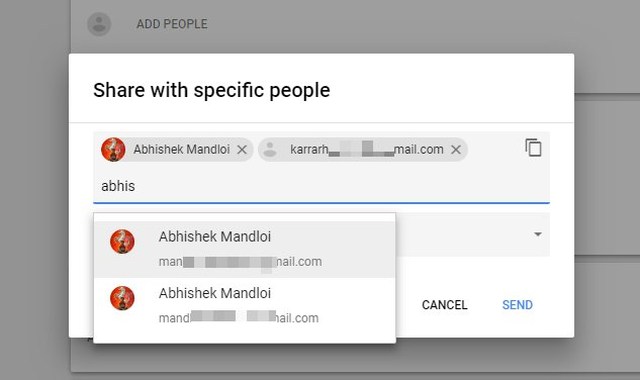
5. And in the below field, select the permissions you want to allow. For example, whether they should only see calendar events or they should be able to edit them as well.

6. Click on the “Send” button to send the invitation.
The receiver will just have to accept the invitation and your Calendar will open inside their Google Calendar interface. If you want, you can later change sharing permissions and even unshare the calendar using the same options.
Share Google Calendar with non-Google account users
If the person you want to share your Google Calendar with doesn’t have a Google account, then you’ll have to make your calendar public before sharing. However, be warned that a public calendar can be seen by anyone with the link and it even appears in Google Search results. Therefore, you should not share any personal information — such as exact location — in any of the calendar events.
Note: Publicly shared calendars can’t be edited by other people. Users can only view the events based on selected permissions.
Here’s how to share Google Calendar with non-Google users:
1. Go to “Settings and sharing” section just like we did in the first two steps above.
2. Move to the “Access permissions” section and check the checkbox next to “Make available to public”. You’ll have to confirm a prompt to enable it.
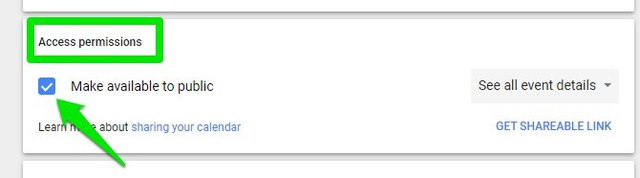
3. Now click on the drop-down menu next to it and select whether all the event information should be shared or only the free/busy timings.
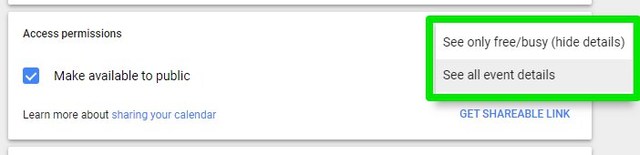
4. Afterward, click on the “Get Shareable Link” button below and copy the provided link.
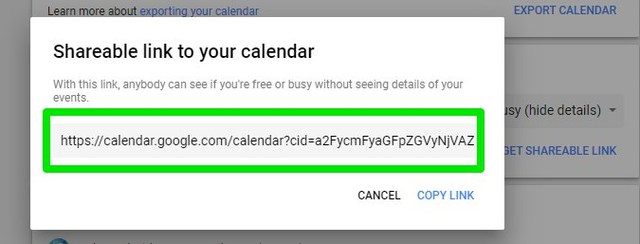
5. Share this link with other people to let them know about your published Google Calendar.
You can un-publish the calendar anytime by unchecking the checkbox next to “Make available to public” option.
Ending thoughts
Both of these methods with let you easily share Google Calendar with other people. Although I should add that when you don’t have emails of all the users or if you need to share the calendar with too many people, then making your Calendar public is a handy option. You’ll just have to announce your public calendar link and everyone will be able to follow it.
The post How To Share Your Google Calendar With Other People appeared first on Gtricks.

via Gtricks https://ift.tt/2KslC3U
 TomTom Home is free desktop software giving you access to the services and content from TomTom as well as from the global community of TomTom users. It is the only tool you need to backup, update, personalize, and manage your TomTom device. You can get the latest TomTom software and updates such as QuickGPSfix, free daily map corrections wit...


 Mirillis Action! allows streaming and real-time recording of your Windows desktop in HD video quality. With Mirillis Action! you can record and stream your game play, web player videos, record music, and capture screenshots. Mirillis Action! provides outstanding performance and GPU utilization which allows the smoothest real-time HD game play v...


 IOTransfer 2 is a lightweight, yet powerful iOS transfer and management tool, which helps iOS users manage their content freely, either on a PC or an iOS device. It is designed for various iOS devices including iPhones, iPads or iPods. With IOTransfer 2 you have an easy way to transfer data between your device and a Windows PC. The new and updat...


 Avira Free System Speedup is the one-click tune-up suite that accelerates your speed, deep cleans your PC, thereby freeing up storage space on your hard drive, and prolonging your PC’s battery life. Avira Free System Speedup is broken down into 3 Feature sets: Analyze Clean Optimize Avira Free System Speedup will first of all analyze...


 Wonder how to select all iCloud photos or delete all your pictures from iCloud Photo Library? Did you ever want to free up iCloud storage and downgrade your storage plan? You can do all of this and even more with the new free CopyTrans Cloudly app. DOWNLOAD Download all your pictures and videos including recently deleted, directly to the fold...


 Nox App Player is a free Android operating system emulator, that allows you to run Android apps on your PC. A separate Mac version is also available. It works by creating a virtual Android tablet on your desktop. This of course means that you can enjoy Android apps and games with the benefit of a bigger screen, better hardware performance and eas...

