
by Kaspersky
Platform:
 Windows 10 / 8.1 / 8 / 7 / Vista / XP
 (3623)
1 used & new from 499.00
(Visit the Bestsellers in Software list for authoritative information on this product's current rank.)
Click Here for Shop
Windows 10 / 8.1 / 8 / 7 / Vista / XP(3623) Windows 10 / 8.1 / 8 / 7 / Vista / XP
 (972)
(972) AnimaShooter Junior is a professional stop-motion animation app with support for Canon DSLRs and HD webcams. With AnimaShooter Junior you can create stop motion animation using your web-camera or camcorder / dv camcorder with Firewire (IEEE 1394) connection. The app supports resolutions up to Full HD (1920x1080). Stop motion animation techniques...


 TeamTalk 4 is a conferencing system which enables a group of people to collaborate and share information. Every member of a group can communicate with other members in real time using both audio and video. All that is needed is a microphone and a web camera. Real time audio and video conversations Public and private instant text messaging Fi...


.png) GridinSoft Anti-Malware (formerly Trojan Killer) is a specialised app that is designed to target numerous different types of malware, including PUPs, spyware, adware, trojans and worms etc. Key Features include: Intuitive interface Comprehensive reporting Deep scan mode GridinSoft Anti-Malware’s full-system scan is both rapid and c...
GridinSoft Anti-Malware (formerly Trojan Killer) is a specialised app that is designed to target numerous different types of malware, including PUPs, spyware, adware, trojans and worms etc. Key Features include: Intuitive interface Comprehensive reporting Deep scan mode GridinSoft Anti-Malware’s full-system scan is both rapid and c...


 CDex is capable of extracting the data from an audio CD and providing you with a WAV file that can be used to create compilation audio CD's or the audio data can be compressed using an audio encoder. CDex supports numerous encoders. WAV files on the hard drive can be converted to a Compressed Audio File (and vice-versa). CDex also supports many ...


I know it’s very frustrating when YouTube has no sound while the other audio programs and websites work fine. However, before you start cursing YouTube, there is a good chance it’s your browser or the PC that is responsible for no sound on YouTube. If you are currently can’t hear sound on YouTube but the video is working fine, then I can help fix it.
I have personally faced this issue many times before, and it seems there is no single solution to this problem. Therefore, below I have listed all the possible solutions to fix no sound on YouTube videos.
Tip: Before you follow these possible solutions, follow the basic troubleshooting steps in my article about fixing no sound issue in Chrome. These simple steps may fix the problem and you won’t have to go through these complicating solutions.
Usually, when I faced no sound on YouTube, it was simply because I accidentally muted YouTube or my browser in the PC volume mixer. Windows has separate volume bars for each media program running on it, so it’s possible to mute YouTube while other audio programs work fine. Here’s how to unmute YouTube in the volume mixer.
1.Play a YouTube video in your browser and make sure it keeps running while you follow the process.
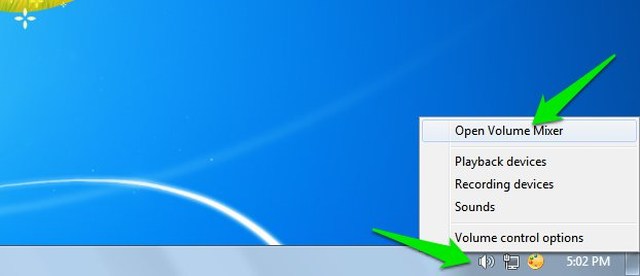
2. Now right-click on the “Speaker” icon on the bottom-left corner of the taskbar and select “Open Volume Mixer” from it.
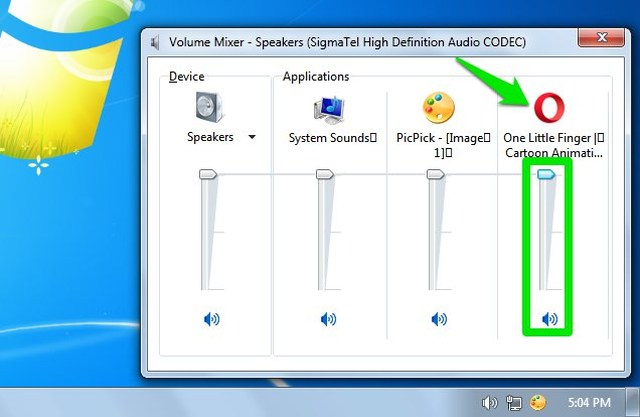
3. Here ensure the YouTube or your browser volume bar isn’t muted or too low to hear.
If some YouTube videos have no sound but others are working fine, then it’s probably due to copyrights issue. Many copyrighted videos illegally uploaded on YouTube don’t have sound. You can’t actually do anything to fix the sound, just report them and move on.
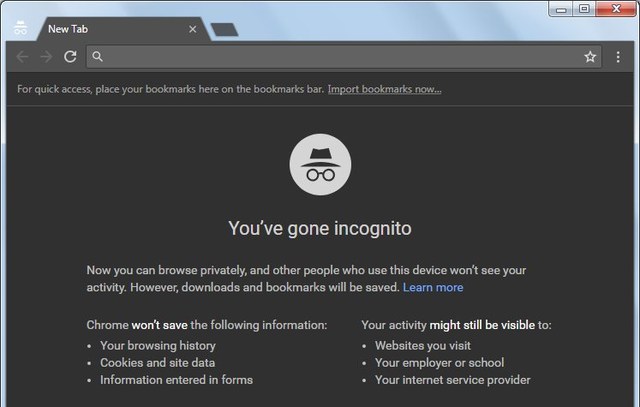
The YouTube sound may not work in the normal window, but it might work in Incognito or Private window. In the Incognito window, browser extensions, cookies, and other stored data don’t work. So if any of the stored data is causing the no sound issue on YouTube, then Incognito window will fix it.
To launch Incognito window, press Ctrl+Shift+N on Chrome and chromium based browsers, and press Ctrl+Shift+P on most other browsers. Now see if it fixes the no sound on YouTube. If it does, then disable any recently installed extensions or plugins as it might be causing the issue. You should also clear browsing data, which I’ll discuss separately below.
Whether YouTube sound worked in Incognito mode or not, clearing browsing data is a good solution to fix this issue. I am going to show you how to clear browser data in Chrome, for other browsers, check out this post.
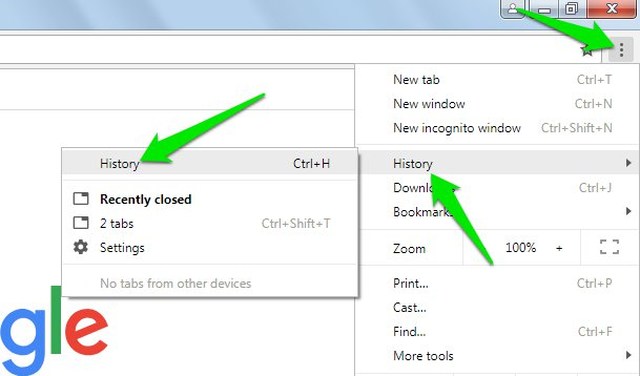
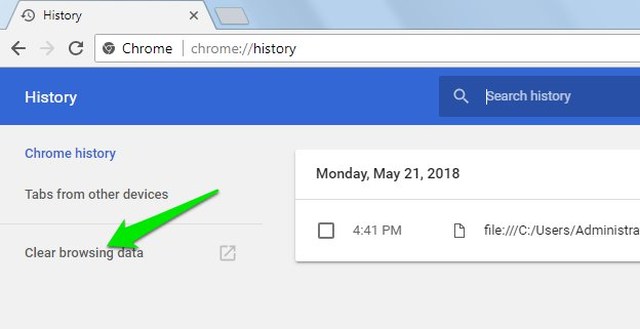
1. In Chrome, click on the main menu at the top-right corner and select “History” from it.
2. Now click on “Clear browsing data” option in the left panel.
3. Here make sure all the options under the “Basic” tab is selected, and then click on “Clear Data”.
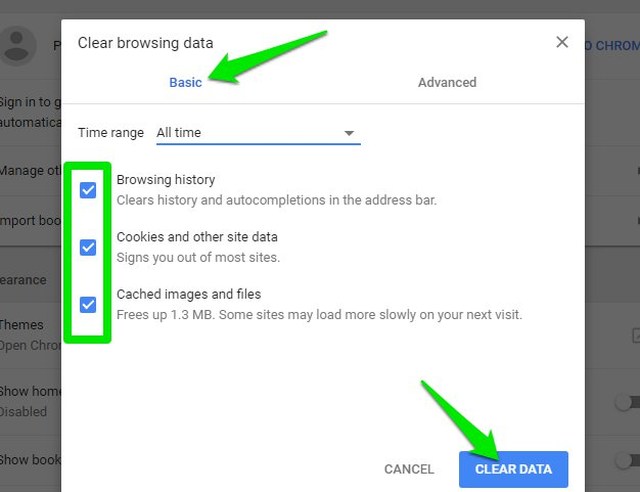
This will clear all the data in Chrome and it might fix the no sound problem on YouTube.
A sure shot way to confirm it’s not a browser problem is to simply switch to a different browser. Chrome, Firefox, Opera, Microsoft Edge, and Safari work fine for watching YouTube videos. Switch to one of these browsers and try to freshly install it so no stored data could interfere. If this fixes the problem, then reset or reinstall your main browser.
There is also a possibility some other audio/video program might be interfering with YouTube sound. Close all the multimedia programs on your PC and in the browser. This includes media players, web applications, other video/audio websites and anything that could play sound or video. Afterward, try playing a YouTube video and see if the problem is fixed.
If the problem is fixed, then open up each multimedia program one-by-one and see which one is causing a problem with YouTube sound.
Like I said before, no sound on YouTube isn’t usually a problem on the YouTube’s end. Therefore, you should focus on fixing your browser or PC settings. But of course, there is also a possibility the YouTube player volume is too low or mute and you didn’t notice it. If you have any questions or tips regarding no sound issue on YouTube, let us know in the comments below.
The post No Sound on YouTube? Here are 6 Possible Solutions To Fix It appeared first on Gtricks.


