I know YouTube has its fare number of issues, but a video platform not displaying video is just unacceptable (unless you want to play audio only). If you are currently just seeing a black screen on YouTube while the sound plays (or not even that), then you are not alone. No video on YouTube is a common issue, even I’ve faced it multiple times before.
However, just like no sound on YouTube problem, this problem also has many causes. Therefore, I am listing multiple possible solutions to fix YouTube black screen issue. Let’s get straight to them.
1. Disable your Ad blocker
If you are using an ad blocker, then it might be the cause of the issue. Some ad blockers can disrupt YouTube videos or are unable to fully block the ads, which leads to video not showing. SImply disable your ad blocker and reload the page. If it works fine afterward, then try switching to a different ad blocker, such as uBlock or Adblock Plus.
There is also a possibility that the YouTube channel owner might have blocked videos for adblock users. So you’ll have to disable your ad blocker to watch their videos.
2. Disable Hardware acceleration
Hardware acceleration is also a common cause of video related issues. Most browsers have hardware acceleration enabled by default, which may lead to YouTube showing a black screen. Just disable hardware acceleration in your browser and see if it fixes the problem.
I am going to show you how to do it on Chrome, if you are on a different browser; then check this guide.
1. Click on the Chrome main menu at the top-right corner and select “Settings” from it.
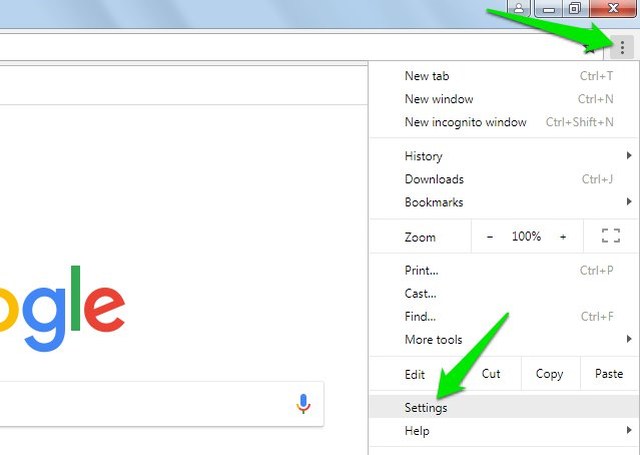
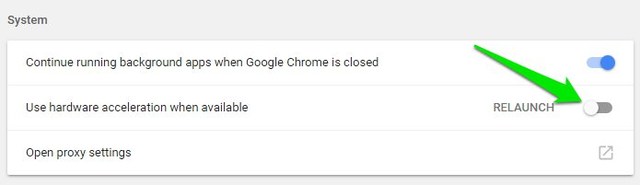
2. Now click on “Advanced” at the bottom and then scroll down and disable the “Use hardware acceleration when available” option.
3. Make sure Javascript is enabled
YouTube requires Javascript to perform many of its functions, if it’s disabled, then videos may stop showing on YouTube. Although Javascript is enabled by default on all the browsers, but you might have manually disabled it. I am going to show you how to enable Javascript in Chrome, for other browsers; refer to this guide.
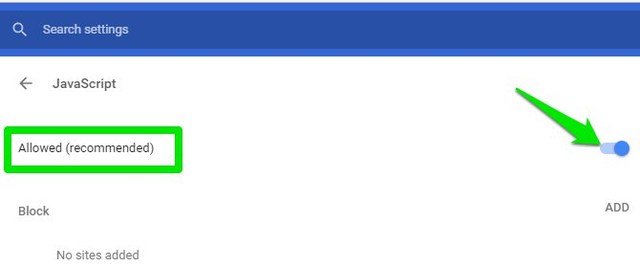
- Type chrome://settings/content/javascript in the Chrome address bar and hit Enter.
- Here make sure Javascript is “Allowed”.
4. Sign out from YouTube
Sometimes logging out of your YouTube account and browsing as a guest may fix this problem (worked for me once). Simply Click on your profile button at the top-right corner and select “Sign out” from it. Once signed out, try playing videos as a guest to see if the problem is fixed.
If this fixes the problem, then, unfortunately, there is no reliable solution to fix it as the problem is at YouTube’s end. For me, I just waited and logged in after a few hours and the videos started working fine. You can try the same, and for now, just browse as a guest.
5. Disable extensions and clear browsing data
If you are still facing the issue after following all the above solutions, then it’s probably a problem with your browser. Your browser data and third-party tools can impact YouTube videos, so it’s better to clean it up.
However, before you do the hard work, open up an incognito/private window and use YouTube inside it. Your browser data and extensions don’t work in a private window, so it should solve the problem. You can press Ctrl+Shift+N or Ctrl+Shift+P to open up a private window.
If this fixes the problem, then here are the instructions to disable extensions and clear data in the popular browsers. Otherwise, skip to the next solution.
6. Use a different browser
If it’s a browser related problem, then switching to a different browser will most probably fix it. You can try out Chrome, Firefox, Safari, Opera or Microsoft Edge. YouTube usually works fine in these browsers.
If the problem is fixed, then either reset your default browser or completely uninstall and then reinstall it. It could also be a bug with the browser update, so you may have to wait until it is fixed and updated.
Ending words
In most cases, video not showing on YouTube is caused by wrong browser settings or third-party tools. However, that doesn’t mean YouTube itself can’t be the culprit. The above solutions should be enough to solve the no video on YouTube problem. If you are still stuck, let us know in the comments what problem you are exactly facing and we may be able to help.
The post YouTube Sound Works But No Video is Showing? Here’s How to Fix appeared first on Gtricks.

via Gtricks https://ift.tt/2t2lEs2
 Sometimes you Windows installation can become corrupted due to a poorly installed apps or Malware, which can modify your settings resulting in your system becoming unstable and unusable. With Tweaking.com Windows Repair you can restore the original Windows operating system’s settings and fix numerous instabilities and problems. Tweaking.com ...


 NTLite Free is an app for Windows administrators that allows you to edit Windows installation images, either 'offline' or 'live'. The 'live' edit mode is a unique feature that lets you modify already installed Windows OS' without re-installation. All you have to do is run the tool on the OS you want to edit, change what you need and reboot if ...


.png) AxCrypt is a highly secure data encryption app that provides AES-128/256 file encryption and compression for Windows. It has a simple interface and works with a single double-click to automatically decrypt and open documents. It has seamless integration with Windows Explorer with no configuration required. AxCrypt is used to share and work ...
AxCrypt is a highly secure data encryption app that provides AES-128/256 file encryption and compression for Windows. It has a simple interface and works with a single double-click to automatically decrypt and open documents. It has seamless integration with Windows Explorer with no configuration required. AxCrypt is used to share and work ...


 Windows 10 / 8.1 / 8 / 7 / Vista / XP
 (3385)


 Opera is a secure web browser that is both fast and rich in features. It has a slick interface that embraces a modern, minimalist look, coupled with stacks of tools to make browsing more enjoyable. These include such tools as Speed Dial, which houses your favorites and Opera Turbo mode, which compresses pages to give you quicker navigation, (even w...


 SpiderOak combines online backup, secure file sync and easy sharing in a cloud based service. Desktop clients are available for Windows, Mac OS X and multiple Linux distributions. Several gigabyte of free storage become available after account creation and can be upgraded to a 100+ GB for a monthly or yearly fee. SpiderOak consolidates several func...

