Read the full article at AskVG.com

via AskVG https://ift.tt/2N2qVJa
Malicious Chrome extensions infecting thousands of computers is like monthly news now. Although Google is working hard to filter and remove malicious extensions, but these extensions always manage to find a crack to slip by. Therefore, it’s important for us users to play our part as well and only install trustable extensions. As easy as I may have shamelessly made it sound, but installing “trustable extensions only” isn’t actually that easy.
Tracking what permissions extensions ask and how they use it isn’t very simple. On top of that, there is also a chance of installing an imitation of a trustable extension, or worst, a legit extension turning rogue – like Hola VPN.
If you are concerned about what type of extensions you have installed and whether they are worth the risk, you’ll need to do a security check. And to make the process easier, today I am going to share a handy Chrome extension called Extension Police that will do a complete security audit of your extensions and also manage them.
In its core, Extension Police analyze the permissions of an extension and provides details to help you understand what type of data the extension is capable of accessing and managing. However, that isn’t the only factor used for auditing. It also takes into account extension developer’s contact information, privacy policy, history, and whether they are verified or not. Furthermore, it detects extensions that mine cryptocurrency, inject ads, and hijack accounts.
Apart from auditing, it also works as a powerful extensions manager. Right from the Extension Police address bar button, you can enable, disable, favorite, and even delete extensions. The active and inactive extensions are shown separately and you can bulk disable/enable extensions as well.
I know you’ll be thinking whether Extension Police itself is safe or not. I did some research and it seems perfectly safe to me. The extension only asks a single permission by default to see and manage your other extensions (that’s a safe permission). You can manually give it the permissions to manage your tabs so you could use it’s “Secure critical websites” feature (more on it later).

I believe not asking for any sensitive permissions is more than enough to call it safe. However, I went a step further and tracked the developer as well. The developer already has multiple popular extensions on the Chrome web store, including the popular 15-in-1 security extension JustBlock Security. You can also check his explanation about Extension Police on MalwareTips forum, it’s eye-opening.
Okay, so now you know what Extension Police does, let’s see how to actually use it. Install the tiny (140KB) extension and click on the extension button in the address bar. It will show all your active and inactive extensions along with indicators to show their potential security risks. The indicators include Danger, High potential risk, Medium potential risk, and Safe.
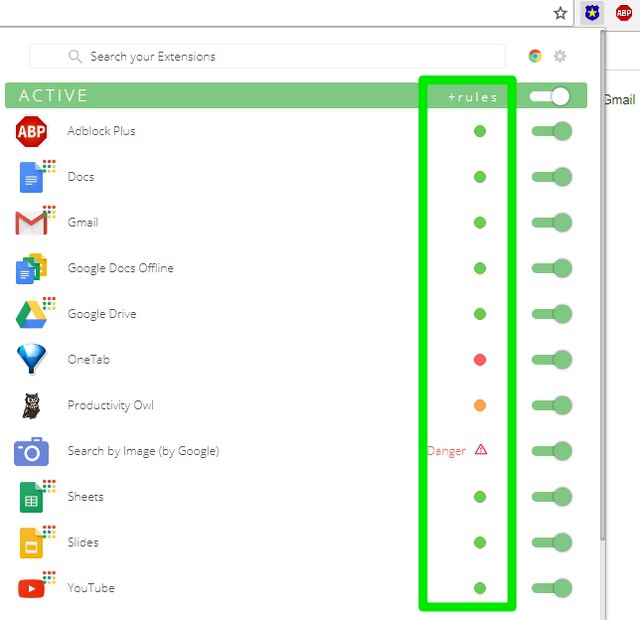
Don’t be surprised if most of your favorite extensions are in High potential risk or Danger zone. As Extension Policy uses extension permissions as a core indicator of risk, many trustable extensions with full access to your data are also listed as High potential risk. You can click on an extension here to see all the details. The details include all the extension permissions, what it can do with your data, contact information, privacy policy, button to delete the extension and more.

You can use all this data to gauge whether the developer is trustable enough to put all your data in his hands. You can also go to Extension Police settings from the “Gear” button at the top-right corner. Here you can enable “Secure critical websites” feature that lets you add sensitive websites (like your bank’s website) to auto-disable list. And whenever you’ll access these sensitive websites, all the extensions will be disabled on them automatically.

Currently, Extension Police is completely free to use and the developer confirms it will stay that way for regular users. However, new features are on their way and some of them might be paid. You can expect more information about developers (highly required feature, I would say), improvements to Secure critical websites feature, and real-time monitoring of other extensions to make sure they aren’t doing anything suspicious in the background.
I honestly found Extension Police to be a must-have extension when there is such a high risk of installing malicious extensions. Agreed, that it still lacks some customization options and more could be done in the extension details section. However, for a rather new extension, I would say it’s on the right track.
Do let us know in the comments if you found Extension Police useful and how it is benefiting you.
The post Inspect All Your Chrome Extensions For Security With this Extension appeared first on Gtricks.


 Advanced IP Scanner is a free, fast and powerful network scanner with a user-friendly interface. In a few seconds, Advanced IP Scanner can locate all the computers on your wired or wireless local network and conduct a scan of their ports. The app scans all network devices, and gives you access to shared folders and FTP servers. It provides remote...


 BurnAware is an easy-to-use burning application that allows you to create discs using different types of files, such as archives, documents, music and videos to CDs, DVDs and Blu-ray Discs. You can also create bootable or multisession discs, high-quality Audio CDs and Video DVDs, make and burn ISO images, copy and backup discs, extract audio track...


 Viber is a popular free Voice-over IP messaging service and Skype alternative, that can be used on your smartphone or PC. The Viber PC client takes the convenience of the mobile app and brings it to your PC so you can stay connected even when you don’t have your mobile phone. It also makes it easier to get on with work and multitask while communica...


 Notezilla Portable is both a handy and a professional looking sticky notes application. With it you can run Notezilla sticky notes from a USB portable drive. This is handy if you work on multiple computers (i.e. between home & office) or you have restricted control over installing new software on your computer. Just insert the drive into your com...


