Recently, I was scorching through the Play Store to find an app that will let me track my favorite cricket and football teams in one place. All I wanted was to track match schedules and score, didn’t expect this to be difficult. However, most apps were either limited to a specific sport or focused on the latest news headlines.
Surprisingly, my search ended with a simple Google Calendar trick that allows me to see all my favorite teams fixtures and score right next to my daily schedule. If you also want to track your favorite sports team without hopping through different apps or searching the web, then keep reading and I’ll show you how to turn your Google Calendar into a real-time sports tracking app.
Adding sports fixtures and score to Google Calendar
Google Calendar comes with different types of calendars to track holidays and events. One of them also allows you to track sports leagues depending on your location. Below I’ll show you how to add it:
Note: You must follow these steps on the desktop version of Google Calendar. You can’t add new calendars on the mobile app, although you can still see the updates.
1. In Google Calendar, click on the “Gear” button at the top-right corner and select “Settings” from it.

2. Here open up “Add calendar” drop-down menu in the left panel and select “Browse calendars of interest” from it.

3. Now move to the “Sports” section and click on the sport you want to track.
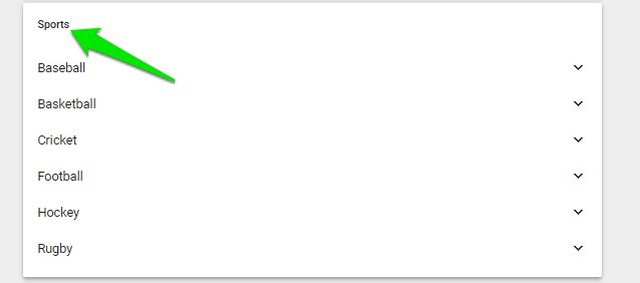
4. Afterward, select the league and then the team you want to track (multiple can be selected).

That’s it, now simply move back to the main page and you’ll see your team’s previously matches score and future fixtures right next to your personal schedules.

The updates from your team will also be shown on the Google Calendar mobile app. However, if you can’t see the updates, then tap on the main menu and select “Settings” from it. Here select the team under your email address and make sure that “Sync” is enabled.
Ending words
Previously I depended on Google assistant for updates, but it isn’t customizable enough. Well, things are much easier for me now that I can see what’s upcoming in the sports world while I glance at my daily schedule. If you know any other easier way to track sports fixtures and score, do lets us know in the comments below.
The post Easily Track Sports Fixtures And Score Using Google Calendar appeared first on Gtricks.


via Gtricks https://ift.tt/2xwADwu

 IOTransfer 2 is a lightweight, yet powerful iOS transfer and management tool, which helps iOS users manage their content freely, either on a PC or an iOS device. It is designed for various iOS devices including iPhones, iPads or iPods. With IOTransfer 2 you have an easy way to transfer data between your device and a Windows PC. The new and updat...


 Avant Browser is a standalone application designed to expand features provided by Internet Explorer. It adds a bunch of features and functionalities to IE and its user-friendly interface brings a new level of clarity and efficiency to your browsing experience, and frequent upgrades have steadily improved its reliability. Avant Browser is freewa...


 Luminar Photo Editor is a powerful all-in-one photo editing suite from developer Macphun. The app is stacked with useful tools and versatile filters to rival the industry’s leading apps from Adobe, namely Photoshop and Lightroom. The app's photo editor has sophisticated filters allow you to make your photos stand out with more vibrancy and ...


 Decrypt and rip the latest DVDs with WinX DVD Ripper Platinum. This Windows-based DVD ripper from WinX offers conversion of a huge range of formats and includes more than 380 preset profiles. WinX DVD Ripper Platinum offers fast, worry-free, conversion of DVD to AVI (DivX/Xvid), MP4, MPEG, WMV, AVC, TS/MTS/M2TS, DVD to MOV and M4V (accepted by Mac...


 ClickCharts is a feature packed diagram flowchart application that allows you to construct almost any type of flow chart or diagram that you need. It has some template diagrams to get you started or alternatively you can begin with a blank canvas. Key Features Include: Open multiple diagrams and edit simultaneously. Print large diagrams wi...


 .descbannerbtn { font-family: Arial,Helvetica,Sans-Serif; background: linear-gradient(#fc8f32 0,#e26a0c 100%)!important; border: solid 1px #be5b0c; color: #fff;text-align: center;font-size: 14px;float:right; display:block;width:141px;height:30px;letter-spacing: 1px; font-weight: 600 !important;font-size: 12px;} .descbannercontainer{padd...


