If you didn’t like the new Gmail design overhaul, then unfortunately, you will have to deal with it. Previously, you could switch back to classic Gmail from the Gmail settings, but Google has removed that option as well. However, if you still miss the old Gmail interface, then I might be able to help.
In today’s post, I am going to share a simple Chrome extension that can give you most goodies of the old Gmail version without sacrificing any of the new features.
Enter Gmail Classic/Old Theme
Of course, you can’t get back the original classic Gmail interface anymore, but you can use a Chrome extension to apply a theme that looks almost like the old Gmail theme. For this purpose, I’ll recommend Gmail Classic/Old Theme extension. The extension replicates 90%+ of the old Gmail interface, including the layout, colors, buttons, and structure.
Using the extension is as simple as installing it. Just install the extension and reload the Gmail page, that’s it, the old Gmail theme will be applied. The prominent changes you will notice is the classic “Compose” button, grey and white theme, classic folder structure, Arial fonts, and the old line spacing.
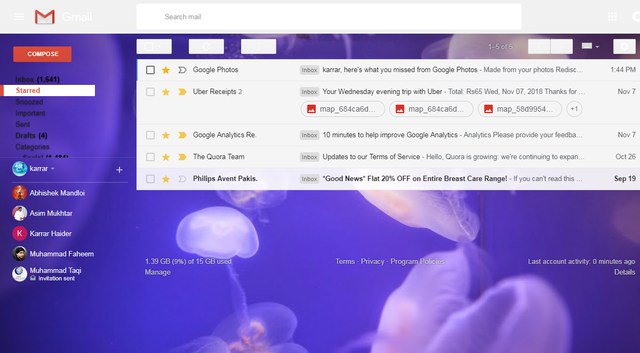
The extension does a fine job of replicating the Gmail old look, but I notice some of the text to be a little distorted, such as the label’s text. Furthermore, the extension doesn’t have any options to customize it, you can only enable/disable it.
Overall, it’s a solid attempt to get back old Gmail interface when there is no option to revert back. Although some options to customize the theme would have been appreciated, such as the ability to change the grey and white theme or separately opt for the features you need.
What do you think about the new Gmail design overhaul? Are you interested in getting back the old Gmail interface? Do share your views in the comments below.
The post Get Back Old Gmail Interface With This New Chrome Extension appeared first on Gtricks.

via Gtricks https://ift.tt/2DapuWA
 O&O DiskImage Professional is an easy way to undertake scheduled auto backups and create manual backups when required. Thanks to the application's recovery system and additional system recovery tools it is easy to restore all your important data. Key features include: Backup an entire computer. Backup system and hard drives, clone dr...


 Windows 10 / 8.1 / 8 / 7 / XP
 (4203)
 Driver Genius is a comprehensive application that scans your system for driver problems. It can then download the drivers you require and updates your system accordingly. It can also backup and update your drivers in a few clicks. Driver Genius has a clean user interface that gives you plenty of information without looking too cluttered. It is e...


 (1272)
.png) Postbox lets you spend less time managing messages and more time getting things done. But what makes Postbox really useful is the way it lets you find and reuse all kinds of content hidden deep within your email. After all, it’s your email... make the most of it! Ultra-Fast Search Postbox makes it easy to search for almost anything across all of ...
Postbox lets you spend less time managing messages and more time getting things done. But what makes Postbox really useful is the way it lets you find and reuse all kinds of content hidden deep within your email. After all, it’s your email... make the most of it! Ultra-Fast Search Postbox makes it easy to search for almost anything across all of ...

