When you edit a shared Google Docs document, other collaborators can easily hover over your profile icon to see your name and even access your Google Plus profile. This can be quite a problem if you are editing a public document, anyone can see who you are and contact you as well. If you are looking to go anonymous on Google Docs while editing or sharing documents, I got you covered.
In this post, I’ll show you how you can anonymously edit Google Docs documents and also share documents anonymously.
Edit Google Docs anonymously
First, let’s see how you can anonymously edit a Google Docs document. Google uses your Google account information to recognize you and show your profile icon in the list of editors at the top. There is no built-in option to hide this information, but if you log out of your Google account then Google won’t be able to attribute your profile information.
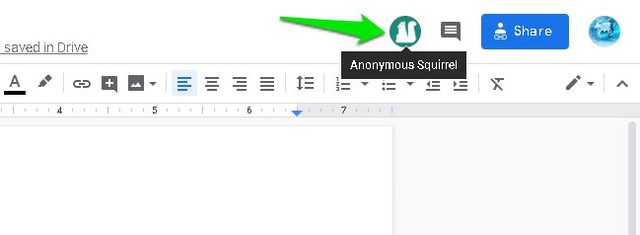
Therefore, all you need to do is log out of your Google account and open up the document link afterward. You will then appear as an anonymous animal icon instead. However, an easier way to do this is to simply use an incognito window to access the document. As the incognito window is isolated from your current browsing session and doesn’t use stored cookies, it will open the document without logging in with your Google account.
Usually, the incognito window option is listed in the main menu of most browsers. You can also use Ctrl+Shift+N or Ctrl+Shift+P keyboard shortcuts to fire up an incognito window.
In the below screenshot, you can see that I am showing up as an anonymous squirrel on my document when I access it from an incognito window.
Share Google Docs anonymously
You can also share a Google Docs document without associating your Google account name and information with it. Here’s how to do it:
Open up the document and click on the “Share” button at the top-right corner.

Here click on the “Get shareable link” button.

Use the drop-down menu to select documents rights, including edit, comment, and view.

Once done, share the below-mentioned link anywhere and the people will be able to access the document without knowing who created the document.

Important note: Although other people will not be able to see the document ownership details, but if you will give them editing rights then they can see the name of the person who made the last edit (which could be you). If you don’t want to share your name as well, then only allow the comment or viewing rights before sharing.
Wrapping up
If you need to work on public Google Docs documents or share them publicly, then anonymity is very important. You definitely wouldn’t want your Google account information available for anyone to see. If you know any other way to go anonymous on Google Docs, let us know in the comments below.
The post How To Go Anonymous on Google Docs appeared first on Gtricks.

via Gtricks http://bit.ly/2BNjUrZ
 MailWasher is the leader in spam filter software, and the easiest way to check and manage your e-mails before you download them. Delete. Remove unwanted e-mails before you download to your computer. Preview. Easily preview the message in your email to see what the sender has to say before downloading it to your computer. Anti spam tools: F...


 Privacy Eraser Free has been designed to help you achieve the most secure digital life that you can, by cleaning not only your Internet history and downloads, but also wiping your drives clean and deleting your data beyond recovery. Key Features include: Schedule scans. Multi-user support. Intuitive interface. Rapid scanning tools. Sec...


 DVDFab 64-bit is a DVD/Blu-ray/video processing application. The application allows you to copy any DVD/Blu-ray disc to a computer HDD and then burn it to blank media, or convert it to a variety of video files to be played on either a computer, portable devices or other compatible display. DVDFab 64-bit is an integrated shareware package that inc...


 DVDFab 32-bit is a DVD/Blu-ray/video processing application. The application allows you to copy any DVD/Blu-ray disc to a computer HDD and then burn it to blank media, or convert it to a variety of video files to be played on either a computer, portable devices or other compatible display. DVDFab 32-bit is an integrated shareware package that inc...


 UltraSurf is a lightweight freeware program designed as an anti-censorship tool. It allows to circumvent firewalls using proxies and employs encryption protocols for privacy. Other applications include protecting your security on public WIFI, hiding your IP address and encrypted communication. When started, UltraSurf automatically finds proxy serve...


