Read the full article at AskVG.com

via AskVG https://ift.tt/2yBLaYt
Swiping up and down and pressing tap or double-tap to control our android phones completely is not merely what we can just imagine, it’s something that we can shockingly do as well. Surprisingly, our gestures too can become the regulator of our phones if it’s needed. Any android phone with its updated version would be enough for you to go ahead. Simply download any of the following apps from the Google Play Store, and have a look at how you can really do that!
Being in a position when we feel it awkward to touch our phone is what all of us experience frequently. For example, we’re having our mealtime and we have to attend an important call, or we’re driving, and we want our favorite songs to play on repeat; we feel bad for not being able to touch the screen. You will not believe it, but doing that is actually possible. You can control your music and video playbacks and calls with waves of your hands over your phone by Wave Control. No touching is required at all, and this is what will make you download the app on every phone you’ll be using from now on!

With the use of Fluid Navigation Gestures, you can control your phone with just two main gestures: quick swipe, and swipe and hold. Busy somewhere, or don’t feel like using the phone but still is necessary, use the app to access back, home screen, recently opened apps, open notifications, open power dialogue, open quick settings, launch any app or shortcut, and much more that you want at the moment!

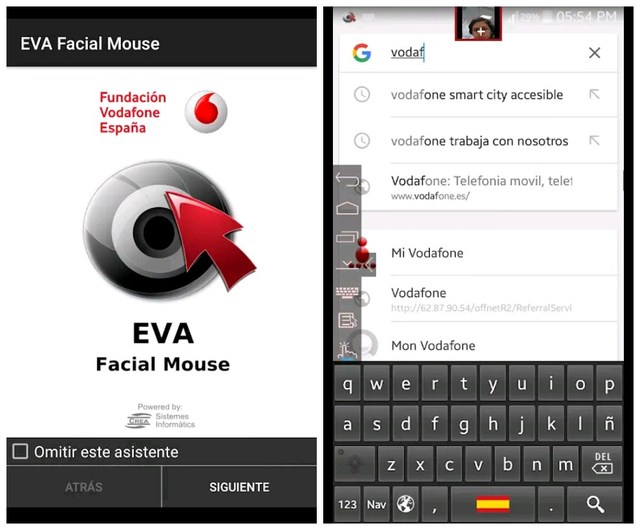
You can use a pointer on the screen of your phone via your face to directly access most elements of the user interface. The movement of your face will decide what do you want to access. Android constrictions have been between the developers of the app and the operating system itself, otherwise I’m pretty sure what is not accessible by using the app at present might have been innovated and featured for its users around the globe by now. Users of the app are specified some compatible apps along with a basic keyboard, which has to be activated by hand after the installation.
To use the app, the first thing you need to ensure is a fingerprint sensor on your device. The second requirement of the app is for you to have Android 6.0+ if you are having any device other than Samsung, while as for Samsung, your device will be easily compatible even if you are using Android version 5.0+. The best thing about the app is that it enables the fingerprint actions of Google Pixel on your device. You can do several things by single tapping or double-tapping and swiping up or down on the fingerprint sensor of your device.

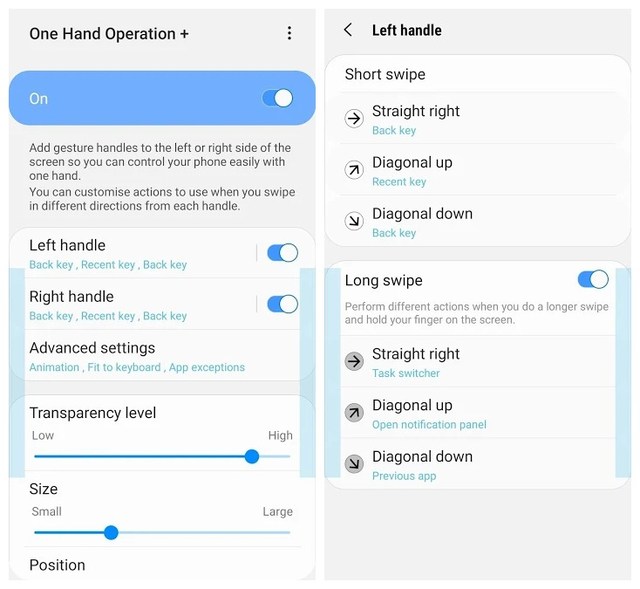
Created by Samsung Electronics, the app allows you to control all the functions of your phone just with your thumb. Thin gesture handles can be added to the left and right sides of the screen that will assist you in executing defined tasks. By default, the back button is set for the handle, something we often use wherever we are. Other options you can set as gestures include home, menu keys, quick tools, screen brightness, recent app, forward web browser and many other options that you tend to do in a hurry without any confusion.
After experimenting all these apps myself, I am recommending you to choose any of these apps, and believe me you will be pleased to see the productivity while navigating your phone. Don’t forget to leave your feedback below in the comments section.
The post 5 Best Android Gestures Apps to Control Your Phone with Gestures appeared first on Gtricks.


In this short post we will see how to setup Basic Authentication in Spring WebClient while invoking external APIs.
WebClient is a non-blocking HTTP client with fluent functional style API. It is part of Spring Webflux module that was introduced in Spring 5. WebClient replaces the RestTemplate to invoke external APIs with non-blocking.
WebClient provides different ways of injecting HTTP headers, query params etc while making external call. In this example we will check how to specify Basic Authentication in Webclient.
Until Spring 5.1, basic authentication was setup using a custom ExchangeFilterFunction. This way of setting up Basic auth was only available while creating WebClient since it relies on WebClient filters.
private WebClient client = WebClient.builder()
            .filter(ExchangeFilterFunctions
                .basicAuthentication(username, token))
            .build();
Alternatively if we want to provide the Basic auth while calling the API, we have to set the Authorization header manually which is not great!
webClient.get()
            .uri("/customers")
            .header("Authorization", "Basic " + Base64Utils
                    .encodeToString((username + ":" + token).getBytes(UTF_8)))
            .retrieve()
            .bodyToFlux(String.class);
Thankfully, Spring provided some helper methods to make this easy and consistent in Spring 5.1.
The above way of setting Basic authentication using custom ExchangeFilterFunction is deprecated in Spring 5.1. A new method setBasicAuth is introduced in HttpHeaders class that can be used to set basic authentication.
Below we set use defaultHeaders in WebClient builder to setup Basic auth while creating WebClient instance:
private WebClient client = WebClient.builder()
            .defaultHeaders(header -> header.setBasicAuth(userName, password))
            .build();
Alternately the basic auth can also be setup while calling any API:
Mono<String> response = client.get()
                    .url("/customers")
                    .headers(headers -> headers.setBasicAuth(userName, password))
                    .retrieve()
                    .bodyToFlux(String.class);
Two variants of setBasicAuth methods are available in HttpHeaders.
void    setBasicAuth(String username, String password)
        //Set the value of the Authorization header to Basic Authentication based on the given username and password.

void    setBasicAuth(String username, String password, Charset charset)
        //Set the value of the Authorization header to Basic Authentication based on the given username and password.
Similar to Basic Auth, we can also setup the Bearer token in WebClient using new method setBearerAuth in HttpHeaders class:
void    setBearerAuth(String token)
        //Set the value of the Authorization header to the given Bearer token.
The process would be exactly similar to setting up the Basic Auth.
The setBasicAuth method in HttpHeaders class makes it easy setting up basic authentication in WebClient Spring WebFlux. The Basic Auth can be setup while building the WebClient or alternatively during invoking APIs using get(), post() etc.


As Google started observing itself being threatened by Amazon’s product searching ability with its wide scope everywhere, it has taken pains of launching its own and new shopping platform for its users in competition with its emerging rival recently to wipe their efforts of gaining more adverts off. Signed in users can access the platform that has just gone live. Most of the products come from the retailers Google has aligned itself with.
As announced earlier in May at Google Marketing, the new Google Shopping platform has gone live just in the United States so far. Although the engine has been in practice with its test of experiencing in different markets of the world including France, but it has not started functioning anywhere outside the US yet, reports suggest. However, this very exercise rather suggests that sooner or later the users would probably start getting benefits of it in their own regions if the company with its new feature goes live everywhere to benefit itself.
They have adopted the strategy of hinting users with different personalized products or items according to their earlier web search for their instant attraction. The users can purchase products through the Google site, a third-party retailer’s site, or in-store; according to the original statement by the giant.
As announced previously, the tech giant is not intent on initiating its own warehouses or shipping, that means the company will not be selling products directly. Despite the indirect purchase, it will offer things with its guarantee, however. Moreover, the users will also be able to claim a refund or return of the item if the product they had purchased is not accurate or timely.
The surge of the event is supposedly the outcome of Google’s vulnerability over the apparent loss of the different adverts of various companies along with their ad budgets, as due to Amazon’s fame, they are taking their ad budgets there, leaving Google to ponder on introducing new stratagems so that they can get it back. The move is thought to be persuasive enough for their retrieval to the tech giant.
Earlier, when in May 2019 the company had announced the remaking of its shopping experience, it was struggling again to gain product searches from the Amazon. In addition to it, the likes on Instagram were also another emerging danger to its marketing as they were fresh E-commerce exertions.
It is thought that the company has taken a huge risk of competing with Amazon, which is certainly an obvious platform for shopaholics around the globe for purchasing products ranging from home appliances to clothes, books, and to several items of regular or irregular use. It then, becomes suggestive of the fact that it will take some time for this feature to being penetrable among customers of different products, but the reason of Google being the most famous and fitting search engine is also an alarm for Amazon, hence implying that there is no failure in the risk of introducing such a platform for its users who are far-flung on the globe.
The post Google’s New Shopping Platform is Now Live in the USA appeared first on Gtricks.


