5 Gmail Add-ons To Simplify Your Email Experience

Google introduced Gmail add-ons at the end of 2017 to improve your email experience. At the time, there weren’t many add-ons worth looking at, but now there are dozens of add-ons to choose from. These add-ons work in the cloud without any local installation on your PC, and you can use them from anywhere you like as long as you can access your Gmail account.

Today, I am going to introduce 5 Gmail add-ons that you will surely find useful whether you are an individual or a small business owner.

1. Analytics Buddy

If you have an online store and use Google Analytics, then Analytics Buddy can be of great help. Analytics Buddy helps create meaningful data out of your unorganized data. It will automatically track the order number in your Gmail order confirmation emails and match it with Google Analytics data to show all the important data right inside Gmail.

Analytics Buddy

You can then use that data to craft a personal email for the customer or simply provide more information for better customer experience.

2. Hippo Video

Having problems working up with your leads? Don’t worry now you can easily engage your leads to convert them into customers. Want to know how? This tool can actually help you make and personalize the video you want to send to your potential customers. You can make catchy phrases to grab their attention, this process can increase the flow of sales funnel, so make your creative videos now and grab your sales.

It also lets your personalize videos by adding a custom name or company name that may attract the recipient to open the email.

3. Smartsheet 

Tired of organizing important emails and attachments? The workplace is always a headache when it comes to organizing things especially your important emails including attachments. If that’s the case, then Smartsheet can make your life a whole lot easier.  It lets you organize emails in a spreadsheet row including the attachments and the body of the email.

Smartsheet 

You can also import your Google contacts on to this which allows you to share them with your contacts. Using this add-on you can organize important emails in a single spreadsheet and collaborate on them with your colleagues.

4. Zoom

The option of video chat and voice chat over email is kind of new, it is so time-consuming in the workplace or anywhere to send an email which could be settled in voice or video call in seconds, so this extension is here to help. It comes with an option to call over your email to connect you directly rather than sitting and writing an email, it’s pretty handy and easy to use, just add it to your email and enjoy calling.

Zoom

As Gmail natively doesn’t offer a way to make audio or video calls while emailing, Zoom is definitely a blessing for those who prefer these quick methods of communication.

5. ToggleBox Recall

This add-on is specifically made for Gsuite users to protect emails under a domain against malware and phishing attacks and recall sent emails. ToggleBox keeps track of the malware and other dangerous viruses and deletes it when it’s detected. Not only that but it can also delete all the emails under a domain by a specified date, keywords, and recipients.

ToggleBox Recall

Furthermore, it also lets you recall your sent messages under the same domain. The recalled message will be deleted from the recipient’s mailbox and you can do this without the help of the administrator.

Ending Words

Zoom and Smarsheet are my favorite Gmail add-ons, and they really make email management and interaction with clients a breeze. Other than these, there are many more add-ons for Gmail that you may find useful. Just go to this Gmail add-ons page and find the one you like.

The post 5 Gmail Add-ons To Simplify Your Email Experience appeared first on Gtricks.


via Gtricks https://ift.tt/2PSHlJH

Download Official Microsoft PowerToys for Windows 10

https://ift.tt/eA8V8J If you have used or still using Windows 95 or Windows XP operating systems in some of your older computers, you...

Read the full article at AskVG.com

via AskVG https://ift.tt/2ZK7Zbf

[Fix] userChrome.css and userContent.css Codes Stopped Working After Firefox Upgrade

https://ift.tt/eA8V8J If you use userChrome.css and userContent.css files in Mozilla Firefox web browser to customize Firefox user interface (UI) and functionality and...

Read the full article at AskVG.com

via AskVG https://ift.tt/2HOJb85

[Opera Beta / Developer Update] Opera 65 Developer Comes with Redesigned UI for Addressbar Dropdown Suggestions

https://ift.tt/eA8V8J NOTE: This article is regularly updated when a new feature is implemented in Beta or Developer versions of Opera web browser....

Read the full article at AskVG.com

via AskVG https://ift.tt/2pT2zaD

[Opera Tip] Enable or Disable New Redesigned “Reborn 3” Dropdown Suggestions UI in Address bar

https://ift.tt/eA8V8J This tutorial will help you in enabling or disabling new hidden secret Reborn 3 (R3) UI in address bar of Opera...

Read the full article at AskVG.com

via AskVG https://ift.tt/2HJP32g

[Fix] Something Went Wrong, Error Code: 0x80004005 While Adding New Account in Windows 10 Mail App

https://ift.tt/eA8V8J If you are trying to add new email account to Windows 10 built-in Mail app and are getting "Something went wrong,...

Read the full article at AskVG.com

via AskVG https://ift.tt/2LfFpGU

3 of The Best Volume Booster Apps For Android

Whether you are in a marketplace or work at someplace where the noise is too much, listening to the audio on your phone can become a bit difficult. Not to mention, the low volume videos on YouTube thanks to those so-called professional Youtubers and their professional recording gear (i.e. their smartphone).

If you are in a situation where the regular max volume of your Android phone isn’t cutting it, then I’ve got you covered with 3 volume booster apps for Android that will boost the volume of your Android beyond its native capability.

1. Volume Booster GOODEV

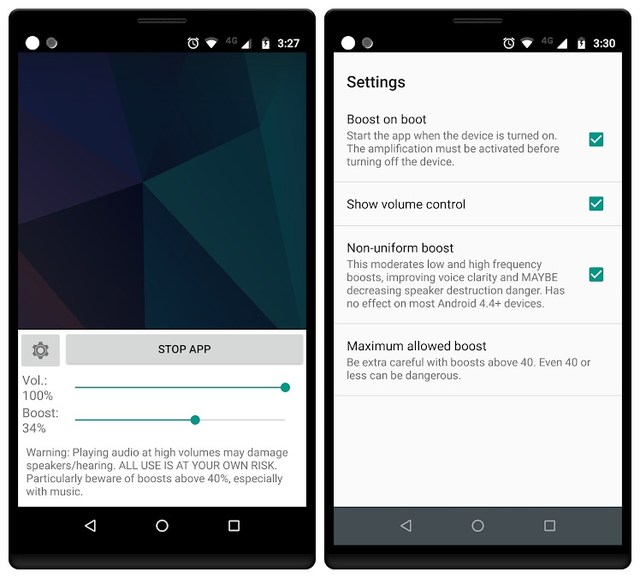
Be attentive, because the app comes with a warning for its users of damaging their earphones or speakers. Now you must be getting the idea of the power that the app has. Its capacity to boost the volume of something is high to such a degree that you can have your headphones around your neck, and still, you will be able to follow the track of the audio being played in the headsets.

Volume Booster GOODEV

The app comes with a single boost slider which can boost the volume up to 60%, and if you want more amplification in the volume for your output speakers, you can adjust it yourself by tuning its settings accordingly. The app doesn’t have an equalizer though. Simple and free, the app is compatible with android version 4.0 and above.

2. Super High Volume Booster

Just like its name and the way the app introduces itself, it performs its functions absolutely by the same token. Whether you are playing a video game or listening to any audio clip, or within any app or browser you feel that the volume of your phone is lower enough that it’s inaudible despite it being turned up to the maximum limits available on the phone, the app helps you increase the loudness of all the things with just one touch.

Super High Volume Booster

Through its extraordinary powers, it interacts with subwoofer and Bluetooth speakers and maximizes the volume as much as you want. The only drawback of this app is extra ads and popups displaying on the screen of your phone, but they are bearable as long as the app is totally free.

3. Speaker Boost: Volume Booster & Sound Amplifier 3D

One of the best features of this app in my view is that you can use it to maximize the volume of your phone while you are on call with somebody. Sometimes the noise in your surroundings is too much that you have to leave the place, which gets awkward for you as well as for all the people sitting around you. You can increase the volume of anything by using this app if you are unable to hear the low-voiced items with your boom, or if you are working on some musical piece but can’t pinpoint all the notes exactly.

Speaker Boost: Volume Booster & Sound Amplifier 3D

Ending thoughts

I hope that any of these apps will be as useful as Speaker Boost: Volume Booster & Sound Amplifier has been for me. All these apps with their powers of amplifying volume and blowing headsets or speakers for yourself are sufficient, and you may have any of these installed on your phone to make your listening easier.

Do keep in mind, however, that extreme and excessive use may harm either your eardrums or your device, so be sober while using them.

The post 3 of The Best Volume Booster Apps For Android appeared first on Gtricks.


via Gtricks https://ift.tt/2HGxrUZ

TIP: How to Customize Keyboard Shortcuts in Mozilla Firefox

If you want to change, customize or disable some built-in keyboard shortcuts (also known as hotkeys) in Mozilla Firefox web browser, this ar...