Read the full article at AskVG.com

via AskVG https://ift.tt/35AyLSS


By default, Gmail shows you the 50 most recent emails you have received in your inbox. This setup works fine for day to day work where the latest emails are of the highest priority. However, if you need to work on very old emails, then moving to them page by page is impractical. The good thing is Gmail allows you to sort emails by the oldest first so you won’t have to skip page by page. And this feature works in all types of inboxes, whether you are in the main inbox, sent items, or promotions.
Here’s how to use this feature. While inside the inbox hover your mouse cursor over the message count at the top right corner. A menu will pop up with the options “Newest” and “Oldest”. Just select “Oldest” here and all the emails in the inbox will be sorted by the oldest first.
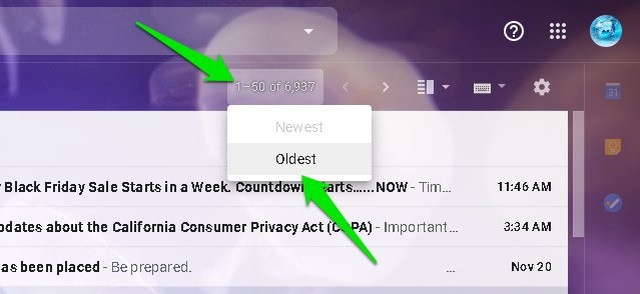
If you have a well-organized Gmail inbox with inbox-zero achieved and you receive hundreds of emails every day, then this feature will also make it easier for you to view older unread emails first.
The post How To Sort Emails in Gmail by Oldest (Quick Tip) appeared first on Gtricks.


