Read the full article at AskVG.com

via AskVG https://ift.tt/3dovkSF

How many times have you had to send a webpage link to someone and then provide complete instruction on exactly where the information is located that you want them to see? Quite often, I am sure. Well, Google has introduced a new Chrome extension that lets you link directly to a specific text section of a webpage. If you want the ability to link to text in your Chrome browser, then keep reading and I’ll show you how it works.
Link to Text Fragment is the name of the Chrome extension that you can download for free. The extension works on the same principle as Google’s search results function that directly links to specific text on a webpage. It adds the first and last six words of the selected text at the end of the URL that point to the text on the webpage.
Currently, the extension works fine on the latest versions of chrome from Chrome 80 and above. It also works on chromium-based browsers such as Opera and Microsoft Edge. However, Firefox and Safari still don’t support this feature. So make sure the person you are sharing the link with opens it in any of the latest chromium browsers.
Now that you know what the extension does, let’s see how you can use this extension. The extension works from the context menu, the extension button serves no purpose. Go to any webpage and highlight the required text using the left mouse click. Now right-click on the highlighted text and select the “Copy Link to Select Text” option. If the link is successfully generated, the text will turn yellow.
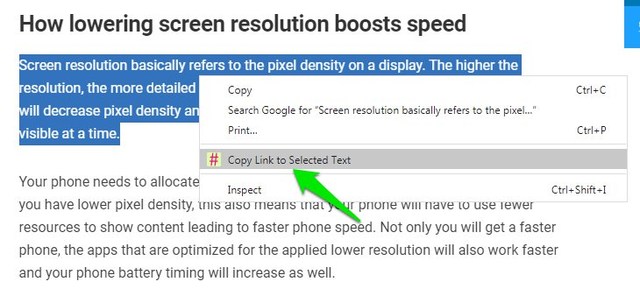
Now when the other person will open the link in the browser, the page will immediately move to the selected text section and it will be highlighted in yellow color. Clicking on the yellow highlight will remove it. For example, you can click on this link and it will directly lead you to the first heading of the article.

I am sure you will find this extension very useful. I am using it for the last three days and it seems to work consistently in most cases. Although I did have trouble generating the link on a page with gifs in between the text. It’s especially useful for linking comments in a forum when the forum doesn’t have that functionality built-in. Let us know in the comments if you found this extension useful.
The post Use This Chrome Extension By Google To Link To Text on Any Website appeared first on Gtricks.


