Read the full article at AskVG.com

via AskVG https://ift.tt/38D1jQi

WhatsApp allows the senders to delete a message as long as it hasn’t been read by the receiver. The sent message is removed from both the notifications panel and the WhatsApp chat. As the receiver, this will of course leave you curious wondering what your friend wanted to say but chose not to.
If you don’t want to be left hanging and want to see what message your friend deleted on WhatsApp after sending it to you, then I know just the app that can help you. In this post, I’ll show you how you can recover deleted WhatsApp messages from senders, whether it’s text message or media files.
There are many apps for recovering deleted WhatsApp messages and I have tried dozens of them. However, most of them either don’t work or just partially recover long messages. Thankfully I have found an app that does a great job of viewing deleted WhatsApp messages reliably. WhatsDeleted is the app and not only it views WhatsApp messages but also lets you recover them and send back to the original sender.
The app is entirely free to use, but it’s ad-supported. I should warn you that the app contains a lot of ads; both full screen and at the bottom. But if you don’t mind some ad interruptions or can buy the pro version to remove ads, then it’s definitely the best app to see deleted WhatsApp messages.
Before I tell you how to use the app, you should know about some of the WhatsDeleted (and similar apps) limitations to make sure it works properly:
Now that you know what to expect, let’s see how to use WhatsDeleted.
When you will launch the app for the first time, you will have to go through the startup process and give the required permissions to the app. The two main permission the app need is access to your media files and permission to view notifications. You must allow both of these permissions, otherwise, the app will not work.
After the initial setup, you won’t have to configure anything; the app will work in the background. When someone will send and delete a message on WhatsApp, you will be immediately notified about it in the WhatsDeleted app. You can tap on the notification to view the deleted message.
You can also tap on the message inside the app to view the full message. If there are multiple messages deleted from the sender, then they will be listed here in sequence. Here you can also take picture of the message or tap on the “Reply” button to move to WhatsApp and reply to the sender.
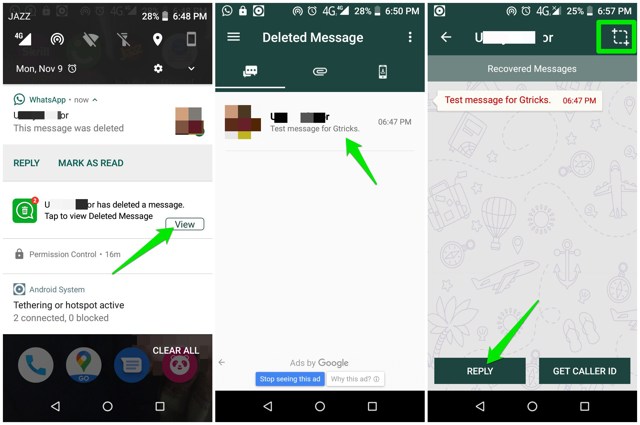
That’s pretty much it, the interface of the app is similar to WhatsApp; so I am sure you will have no trouble navigating. If you want to view a deleted media file, just swipe left and the attachments section will open.
I am sure you will find this app very useful if you often deal with deleted messages. You should download and set up this app right away as it can only view WhatsApp messages that were deleted after the app was installed. If you know any other reliable Android app to see deleted WhatsApp messages, let us know in the comments below.
The post Here’s a Simple Android App To See Deleted WhatsApp Messages appeared first on Gtricks.


