Last year, Google promised material makeover for Gmail and this April it started rolling out the major overhaul. With an awesome makeover, Google also introduced a few interesting features, such as Smart Compose. Although most of the new features are a welcome addition, but you might find the new Nudge feature a bit annoying.
Originally an Inbox by Gmail app feature, Nudge reminds you to follow up on sent emails and reply to old emails. However, if you are one of those users who prefer inbox zero, then these notifications may become annoying for you. If you don’t find the new Gmail Nudge feature useful, then here’s how to disable Nudge on Gmail web and mobile app.
Disable Nudge on Gmail web app
As the Nudge feature comes with the new Gmail design, I am considering you are already using the new Gmail design and currently dealing with nudges. Here’s how to disable Nudge on the web:
1. Click on the “Gear” icon at the top-right corner and select “Settings” from it.

2. Now under the “General” tab, move to the “Nudges” section.
3. Here you can individually uncheck options to disable suggestions for replies and follow-ups.

I am personally keeping it disabled for replies, but I’ve enabled it for follow-ups to possibly snatch a missed opportunity. You should also find a balance according to your need and only disable the option you don’t need.
Disable Nudge on Gmail mobile app
Similar to the web app, it’s really easy to disable Nudge on the Gmail mobile app. Just make sure you have the latest version of Gmail and follow the below instructions:
1. Tap on the main menu at the top-left corner (three horizontal lines) and select “Settings” from it at the bottom.
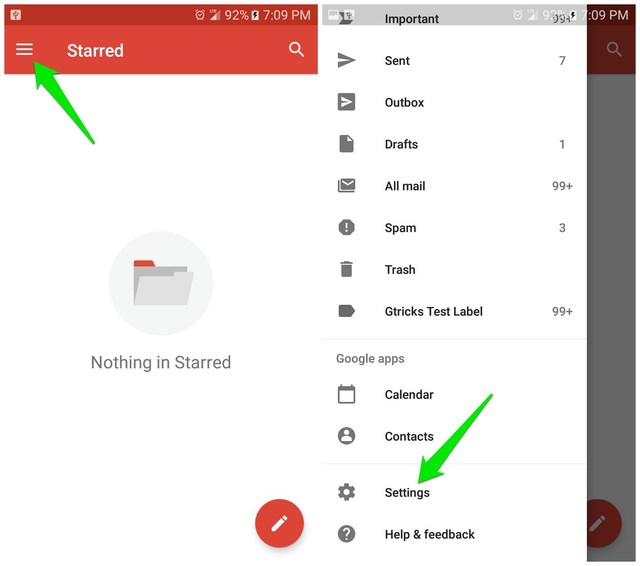
2. Afterward, select the email address for which you would like to disable Nudge.
3. Scroll down and tap on “Reply and follow up” under the “Nudge” section.
4. Now just uncheck the feature that you don’t need.

Note: You’ll have to repeat this process for each Gmail address separately if you have multiple accounts connected.
Ending words
I am sure Nudge is a great feature for your work email address, but for personal accounts with lesser email load; it’s just annoying. Do share in the comment what you think about the Nudge feature and why you are disabling it.
The post Disable Nudge in Gmail To Stop Those Pesky Follow Up Suggestions appeared first on Gtricks.


via Gtricks https://ift.tt/2I5SeyH

No comments:
Post a Comment
If you have any question please let me know