Read the full article at AskVG.com

via AskVG https://ift.tt/2QEvXMV

Where modern technology has curtailed almost all walls of antiquity and made our lives much easier; baby nursing is not something left uncovered. Parents, usually moms, purchase baby monitor devices to keep a watchful eye on their toddlers for bridging this gap while they are away doing something else, or if the baby is asleep.
A good baby monitor device can cost anywhere between $150-250, which is quite a lot. If you are not ready to make such an investment right now, then you can also turn your Android phone into a fully equipped baby monitor. This can be done with a baby monitor Android app, and if you are up for it; then I bring you 3 of the best baby monitor Android apps below.
It’s the best app with its reliable features partaking in caring about your child when you are out somewhere. It includes almost all audio functions that a hardware baby monitor normally performs along with the feature of video streaming as well. And even if in a hurry you couldn’t place the phone around your baby accurately, the microphone of the device with your baby would configure and adjust microphone settings itself.

You can also pare many devices at the same time if there are many family members taking care of your baby. You can be notified of any missed call or text message arrives at your baby’s phone and also when the connection with your baby’s device is lost anyhow; hence with its extraordinary smart features, you can be in touch with your baby easily.
The app works in the background even if the screen of your phone is off. The app allows free check on your baby for 4 hours per month. For unlimited usage, you’ll have to upgrade to premium version costing $4.99/year or $8.99 for lifetime access.
It’s the best app for parenting I can say lest you want organized things around you every time. Without extra whistles and tones, the app turns your device into a baby alarm with customizable sensitivity and alerts you with a call or text message if your baby feels restless or starts crying during his sleep.

If your alarm is triggered, its image surveillance option lets you know about your baby by taking and sending the snap of your baby to your phone. With its additional features, you can also take notes to examine your baby sleeping-time, and get useful tips to get your baby to sleep as well. Overall, it’s a simple baby monitoring app that gets the job done without any fuss. The app is completely free to use, but you’ll have to deal with ads.
Alfred Home Security Camera is basically a normal live surveillance app and video footage recorder; allowing you to take care of your loved ones, and safeguarding crimes such as theft and illegitimate intrusion anywhere. However, its features are sufficient to be used as a free monitor for your baby with any spare device.

Just install the app, pare both devices, and place it around your baby to monitor him wherever you are. The app will keep you informed about every action of your baby with motion sensors and instant alerts. You can also assure your presence around your baby by talking to him through its walky-talky feature. And in case you notice a cute move of your baby, the app does allow you to have a video captured, and you can save, stream, and download it without any kind of trouble.
Even though there are hundreds of baby monitor apps, I’ve taken out the best apps for you to make sure that you can show good parenthood, and your baby is well taken care of! Alfred and Baby Monitor by MVA are good simple and free apps that should work fine for most parents. However, Dromi is the all-around best option if you are willing to pay a few dollars for unlimited monitoring. Let me know below in the comment box which of these apps you like the most.
The post Top 3 Baby Monitor Apps For Android To Monitor Your Baby appeared first on Gtricks.


Although standard links work fine for linking to your business landing page while emailing a potential client. However, if you want to increase your conversions, then hyperlinking an important image would be much more fruitful. People tend to be attracted more by a call-to-action image than a dull link.
If you are interested in hyperlinking an image in your emails, then I got you covered. In today’s post, I’ll show you how you can add a link to an image in Gmail emails.
You don’t need a third-party app to achieve this, but it does require some tricky instructions are needed to be followed exactly. Make sure you follow the below instructions as it is because some of the steps have similar options that could mess up the process.
Step #1: First, open up the compose window in Gmail from the “Compose” button at the top-left corner.

Step #2: Here move to the email body area and click on the “Insert photo” option at the bottom. Make sure you use Insert photo option to add the image, images uploaded through Attach files option can’t be hyperlinked.
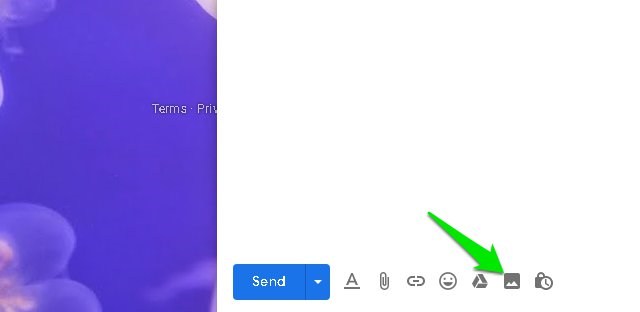
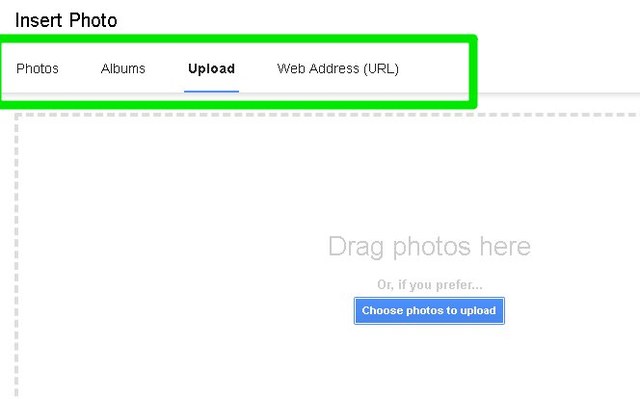
Step #3: You’ll find multiple options to add a photo, including URL, Google Drive, and upload from the PC. Use any option to select the photo and click on “Insert” to add it in the email body.
Step #4: Now you must highlight the image. While the image is still unselected, left-click on it, hold the click, and then drag a little until the whole image turns blue in color. Afterward, click on the “Insert link” button at the bottom or use the Ctrl+K keyboard shortcut.

Step #5: Click on the “Change” button next to the current hyperlink of the image.
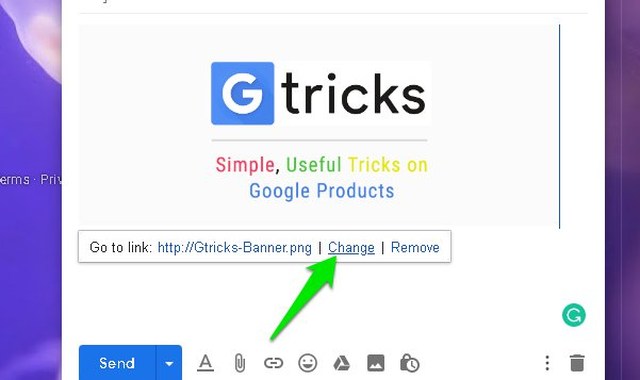
Step #6: Here replace the image link with whatever link you want and click on “OK”.

That’s it, the link will be added to the image and any recipient can just click on the image to go to the link destination.
Tip: You can also use the above process to hyperlink your email signature image if you are using one. For example, if you have your company logo in your Gmail signature, then you can hyperlink it with your company’s website home page for direct access. While creating an image-based signature, simply use the above instructions to hyperlink the uploaded signature image.
If you have precisely followed the instructions as mentioned, then hyperlinking the image shouldn’t have been difficult. I know some users may get confused with attach files and insert photo options, as both can upload and send the photo. Furthermore, there is also a difference between highlighting and selecting an image, make sure you highlight the image for hyperlinking.
How will you be using this little neat trick to make images interactive? Do share with us in the comments below.
The post How To Hyperlink an Image in Gmail Emails appeared first on Gtricks.


Google allows a journalist named Mark Wilson from Fast Company, the world’s leading Progressive Business media brand, to call on inside their top-secret design lab where the tech giant manufactures its hardware products ranging from smartphones to smart speakers sought-after in every nook and corner of the world.
According to the original article containing thorough particulars of the premises and environs of the lab, the building is on Google’s Mountain View, California, campus; and is of seventy thousand square-foot, and consists of only 150 fortunate designers who take pride in planning, crafting, testing, and issuing its tens of hundreds of products that it launches every now and then under the leadership of vice president and head of hardware design Ivy Ross. She herself being a jewelry designer has enormous knowledge of creating customized and optimized designs of products as can be observed through her vivid opinions about the building and products.
“Google’s blueprint for how they optimize is great for most people at the company,” she says, adding that designers need different things.
Astoundingly, the lab is impermissible to most of the company’s employees. Mark Wilson is the first-ever journalist to have sneaked into the inside of the building space, which Ross refers to as a huge gift from Google’s executive team during the visit.
The lab was in its establishing phase when it was opened last year in June 2018, facing a lot of difficulties in its best setting for its employees to see any kind of enhancement to promote its products. To overcome such an issue, Ross, being a jewelry designer joined in with the architect behind many other Google’s buildings named Mithun and came up with this homelike building where one can have tactile experiences such as (fabricated-covered gadgets) as understated in the original article on the media group’s website.
To initiate the process of making it better and more friendly, instead of the darkness that is usually required while working in such tech companies, she tells that she indicated at the need of introducing light in the building.
“Essentially the first thing I said was, we need light,” she recollects, reminiscing about her earlier days in the lab when it was undergoing the process of renovation.
As stated by the journalist, the lab is a two-story at the entrance and has a skylight atrium capacitating comfortable seating and café tables to arrange casual meetups. The staircase leads up to the library having six favorite books of each employee, and a note inscribed on them suggesting the reason for these books being important to them.
The second story pavement gives the impression of a shopping mall to employees, making the environment of window-shopping as one can see glass walls on both sides: one for color lab, while the other for material lab; so that designers can come up with new and innovative ideas.
Despite allowing the journalist to have a look at the aesthetics of lab, many things as reported were left covered, suggesting the probability to maintain the security of them, and to keep things unrevealed until they are out in the market.
The post The First Ever Journalist Allowed to Walk Through the Google’s Top-Secret Lab appeared first on Gtricks.


