Read the full article at AskVG.com

via AskVG https://ift.tt/2HJP32g

Whether you are in a marketplace or work at someplace where the noise is too much, listening to the audio on your phone can become a bit difficult. Not to mention, the low volume videos on YouTube thanks to those so-called professional Youtubers and their professional recording gear (i.e. their smartphone).
If you are in a situation where the regular max volume of your Android phone isn’t cutting it, then I’ve got you covered with 3 volume booster apps for Android that will boost the volume of your Android beyond its native capability.
Be attentive, because the app comes with a warning for its users of damaging their earphones or speakers. Now you must be getting the idea of the power that the app has. Its capacity to boost the volume of something is high to such a degree that you can have your headphones around your neck, and still, you will be able to follow the track of the audio being played in the headsets.
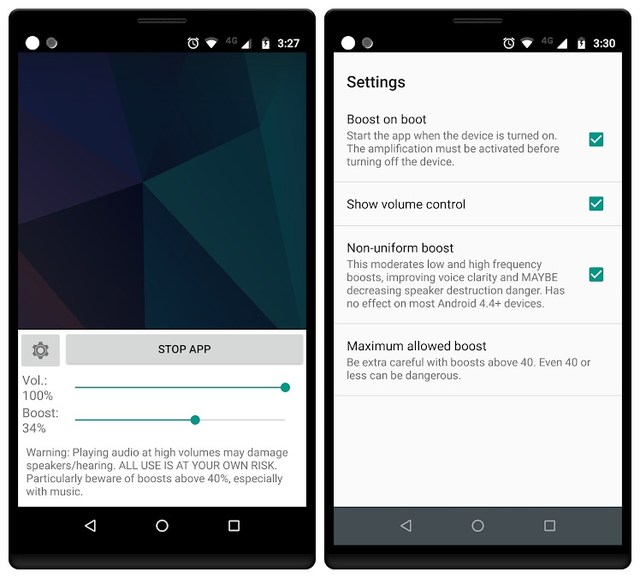
The app comes with a single boost slider which can boost the volume up to 60%, and if you want more amplification in the volume for your output speakers, you can adjust it yourself by tuning its settings accordingly. The app doesn’t have an equalizer though. Simple and free, the app is compatible with android version 4.0 and above.
Just like its name and the way the app introduces itself, it performs its functions absolutely by the same token. Whether you are playing a video game or listening to any audio clip, or within any app or browser you feel that the volume of your phone is lower enough that it’s inaudible despite it being turned up to the maximum limits available on the phone, the app helps you increase the loudness of all the things with just one touch.

Through its extraordinary powers, it interacts with subwoofer and Bluetooth speakers and maximizes the volume as much as you want. The only drawback of this app is extra ads and popups displaying on the screen of your phone, but they are bearable as long as the app is totally free.
One of the best features of this app in my view is that you can use it to maximize the volume of your phone while you are on call with somebody. Sometimes the noise in your surroundings is too much that you have to leave the place, which gets awkward for you as well as for all the people sitting around you. You can increase the volume of anything by using this app if you are unable to hear the low-voiced items with your boom, or if you are working on some musical piece but can’t pinpoint all the notes exactly.

I hope that any of these apps will be as useful as Speaker Boost: Volume Booster & Sound Amplifier has been for me. All these apps with their powers of amplifying volume and blowing headsets or speakers for yourself are sufficient, and you may have any of these installed on your phone to make your listening easier.
Do keep in mind, however, that extreme and excessive use may harm either your eardrums or your device, so be sober while using them.
The post 3 of The Best Volume Booster Apps For Android appeared first on Gtricks.


Ever got baited by a fiery video thumbnail only to show a guy nagging about the politician he dislikes? I know it feels really bad to waste a good few minutes of your life like this, but it’s simply how YouTube works. Creators have the option to add thumbnail from outside the video, therefore they can add anything that could be attractive enough to make you click it.
If you are tired of clickbait thumbnails or those all-caps titles, then there’s a way to get rid of them. Today I will introduce a simple browser extension that can get rid of all the clickbait thumbnails and all-caps titles on YouTube.
Clickbait Remover for YouTube is an open-source extension (source code) that lets you replace any custom thumbnails added by video creator with an actual frame from the video. You get to choose from which part of the video the thumbnail should be chosen. You can also make all the titles lower-case or just the first letter capital, which can be very helpful to even-out the attention to videos.
The extension is available on both Chrome and Firefox, and it should also work fine on other chromium-based browsers (worked fine for me on Opera). The best thing about the extension is that it changes thumbnails and titles in real-time, there is no need to refresh the page every time you make a change. This can be very useful if you want to see thumbnails from different parts of the video quickly.
Using the extension is very simple, just install it in your browser and move to any page on YouTube; it could be search results, home, channel or trending page. Now click on the extension and select from which part of the video the thumbnail should be grabbed. It could be the start, middle or the end, and the thumbnails on the YouTube page will change as you make your selection.
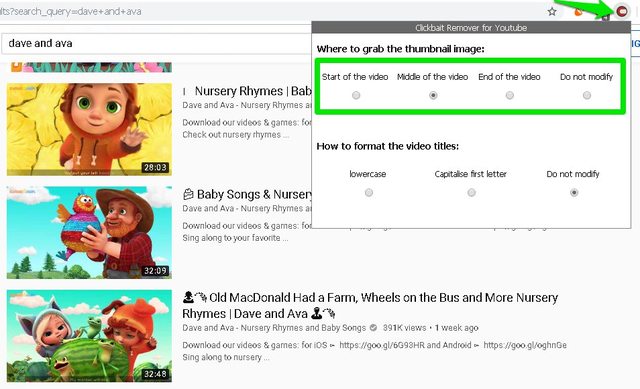
If you also want to change titles, you can select the option “lowercase” or “Capitalise first letter”, which will change all the video titles on the page. And of course, you can always select “Do not modify” option to load the original video thumbnails and titles.
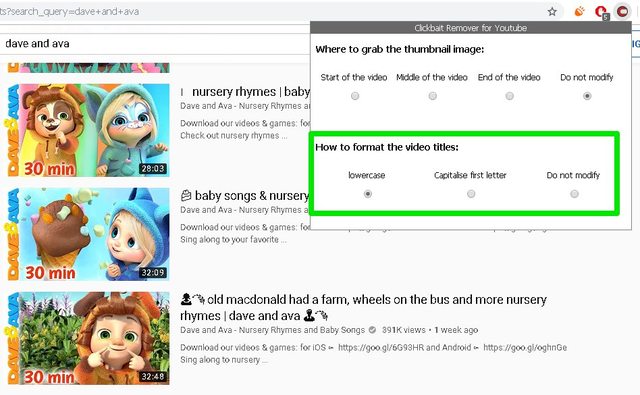
Clickbait Remover for YouTube isn’t a silver bullet to save you from all the clickbait videos as the title wordings itself can be misleading. However, it will surely save you from many clickbait videos that use custom thumbnails to make you click. Let us know in the comments if you found this extension useful.
The post Here’s How To Stop Clickbait YouTube Videos From Wasting Your Time appeared first on Gtricks.


