Tech News is a blog created by Wasim Akhtar to deliver Technical news with the latest and greatest in the world of technology. We provide content in the form of articles, videos, and product reviews.
Smartphones are largely based on applications that are used for the fulfillment of different functions. On Android, the most appropriate source for every one of us to download them is verily Google Play Store. But there are thousands of apps available that don’t either make it to the Play Store due to any reason or are banned due to the restrictions imposed by Google. Many of such apps have been wonderfully designed, and are very helpful while using them on your android device.
If you are ready to go beyond the ecosystem of Google Play Store, then below is the list of 5 such apps that you will not find on Google Play Store,
If you are an avid reader, then this app is something you won’t mind installing on your phone in the least. It’s an awesome manga reader with customizable settings and optimized features for android users. You can select any book of your choice from the list available there, and start reading wherever you are. The app is freeware and available for both-online and offline-use. You can even stick your bookmarks if you have to leave reading in between so that you can resume next time from the same spot.
Due to its somewhat unauthorized permissions, Google has not allowed its entrance in its Play Store. But honestly, it’s the best equalizer for you especially if you are an audio geek. You can use this lab to make the best out of your songs, sound clips, audios and so forth. It has plenty of filters, effects, and features that you can use to enhance your experience with your favorite music.
The app is compatible with even newbies seeking improvements in any of the clips in their phones. The only problem with this app is that it works with rooted android devices.
After talking about readers and music lovers, how can we neglect popcorn lovers? And this very word “POPCORN” reminds each of us of a cinema hall, comfortable seats, friends around, warm environment, popcorn in hands, and a big screen in front televising movie of our own choice. Yes, you got it right! The app is a comfortable way to watch hundreds of movies and TV series of your own choice on your smartphone without having to download anything. It works like a torrent, and its first screen shows recent releases available to you.
I know how extra pop-ups and ads bother you especially when you’re in the midst of things. Blokada is an open-source ad-blocker that lets you do away with them both apps and browser. It requires android version 2.1 and above. In other words, any android phone at the present time will be fine with this app. You won’t find it on Google Play Store as ad blocker apps are prohibited by Google, but you can easily find it on its own website.
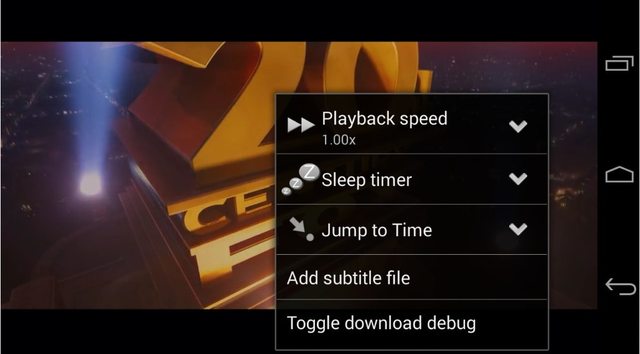
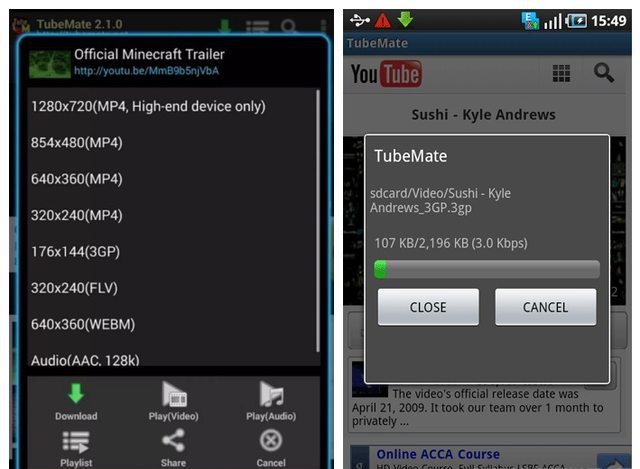
The app is the best tool for downloading Youtube videos. By using this app, you can also convert your video files into audio files, and resize them according to the space you have available in your device. Previously Play Store’s terms and conditions were enough friendly in this regard, so there were tons of apps available on the Google Play Store you could use to download videos from, but now they’ve dropped a ban so users are supposed to rely on third-party apps; Tubemate is one of the best apps for this in my opinion.
Ending Thoughts
Because I like reading a lot, so my favorite is Tachiyomi. Due to the unavailability of time, very rarely I do use Popcorn Time to watch my favorite series. Which one of these apps you like, do let me know underneath in the comment box.
I've never thought of myself as a "car person". The last new car I bought (and in fact, now that I think about it, the first new car I ever bought) was the quirky 1998 Ford Contour SVT. Since then we bought a VW station wagon in 2011 and a Honda minivan in 2012 for family transportation duties. That's it. Not exactly the stuff The Stig's dreams are made of.
The station wagon made sense for a family of three, but became something of a disappointment because it was purchased before — surprise! — we had twins. As Mark Twain once said:
Sufficient unto the day is one baby. As long as you are in your right mind don't you ever pray for twins. Twins amount to a permanent riot. And there ain't any real difference between triplets and an insurrection.
I'm here to tell you that a station wagon doesn't quite cut it as a permanent riot abatement tool. For that you need a full sized minivan.
I'm with Philip Greenspun. Like black socks and sandals, minivans are actually … kind of awesome? Don't believe all the SUV propaganda. Minivans are flat out superior vehicle command centers. Swagger wagons, really.
The A-Team drove a van, not a freakin' SUV. I rest my case.
After 7 years, the station wagon had to go. We initially looked at hybrids because, well, isn't that required in California at this point? But if you know me at all, you know I'm a boil the sea kinda guy at heart. I figure if you're going to flirt with partially electric cars, why not put aside these half measures and go all the way?
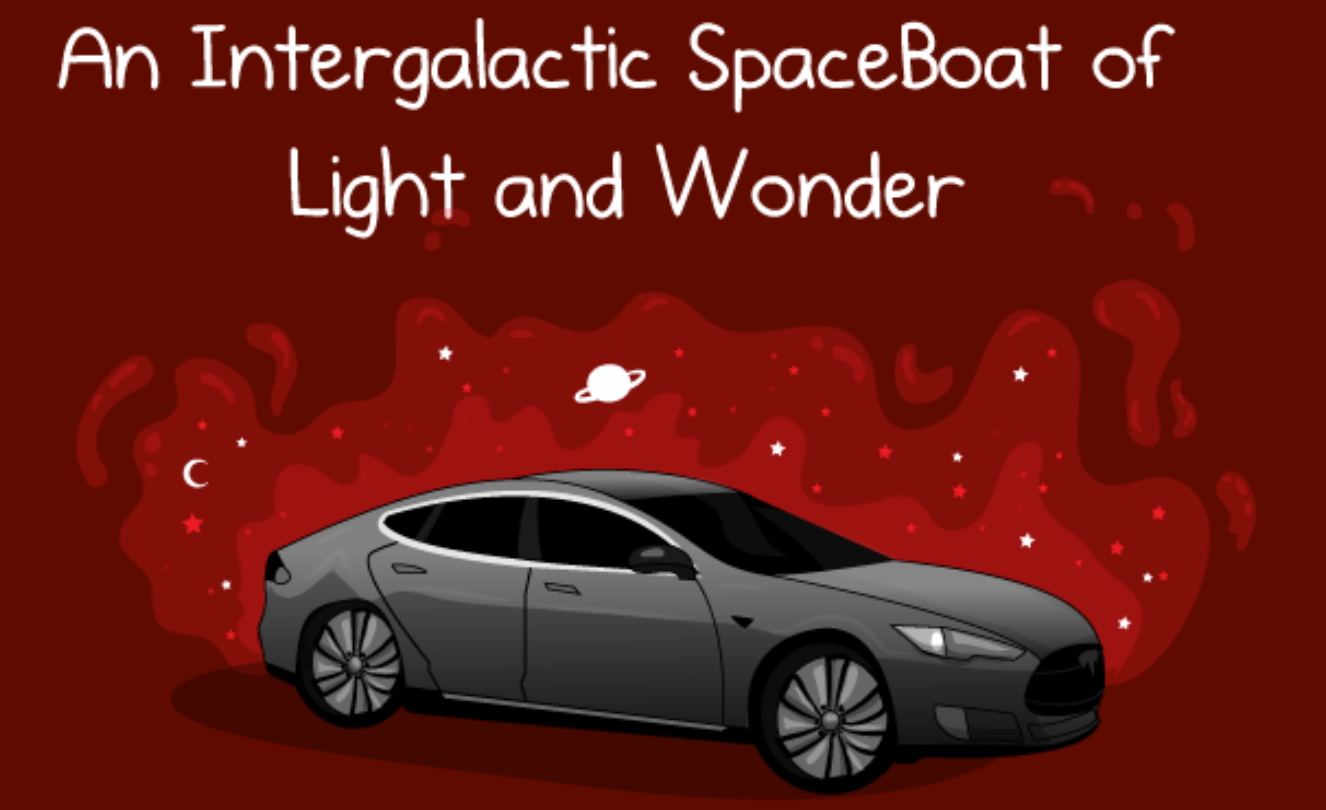
It's been 5 years, but from time to time I'd see some electric vehicle on the road and I'd think about that Intergalactic SpaceBoat of Light and Wonder. Maybe it's time for our family to jump on the electric car trend, too, and just late enough that we can avoid the bleeding edge and end up merely on the … leading edge?
I've somehow gone from being a person who basically doesn't care about cars at all … to being one of those insufferable electric car people who won't shut up about them. I apologize in advance. If you suddenly feel an overwhelming urge to close this browser tab, I don't blame you.
I was expecting another car, like the three we bought before. What I got, instead, was a transformation:
Yes, yes, electric cars are clean, but it's a revelation how clean everything is in an electric. You take for granted how dirty and noisy gas based cars are in daily operation – the engine noise, the exhaust fumes, the scent of oil, the black dust that descends on everything, washing your hands after using the gas station pumps. You don't fully appreciate how oppressive those little dirty details were until they're gone.
Electric cars are (almost) completely silent. I guess technically in 2019 electric cars require artificial soundmakers at low speed for safety, and this car has one. But The Oatmeal was right. Electric cars feel like spacecraft because they move so effortlessly. There's virtually no delay from action to reaction, near immediate acceleration and deceleration … with almost no sound or vibration at all, like you're in freakin' space! It's so immensely satisfying!
Electric cars aren't just electric, they're utterly digital to their very core. Gas cars always felt like the classic 1950s Pixar Cars world of grease monkeys and machine shop guys, maybe with a few digital bobbins added here and there as an afterthought. This electric car, on the other hand, is squarely in the post-iPhone world of everyday digital gadgets. It feels more like a giant smartphone than a car. I am a programmer, I'm a digital guy, I love digital stuff. And electric cars are part of my world, rather than the other way around. It feels good.
Electric cars are mechanically much simpler than gasoline cars, which means they are inherently more reliable and cheaper to maintain. An internal combustion engine has hundreds of moving parts, many of which require regular maintenance, fluids, filters, and tune ups. It also has a complex transmission to translate the narrow power band of a gas powered engine. None of this is necessary on an electric vehicle, whose electric motor is basically one moving part with simple 100% direct drive from the motor to the wheels. This newfound simplicity is deeply appealing to a guy who always saw cars as incredibly complicated (but computers, not so much).
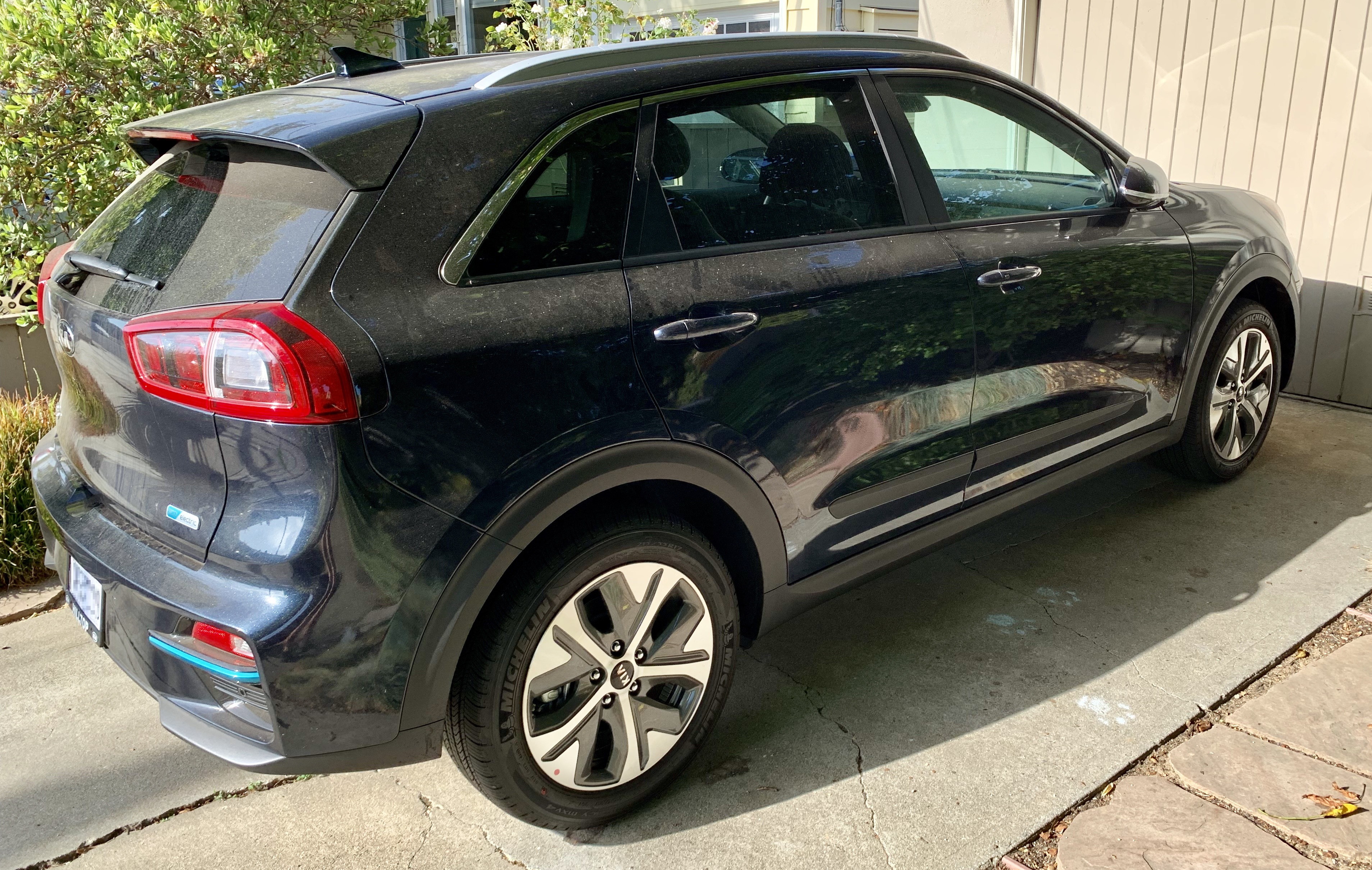
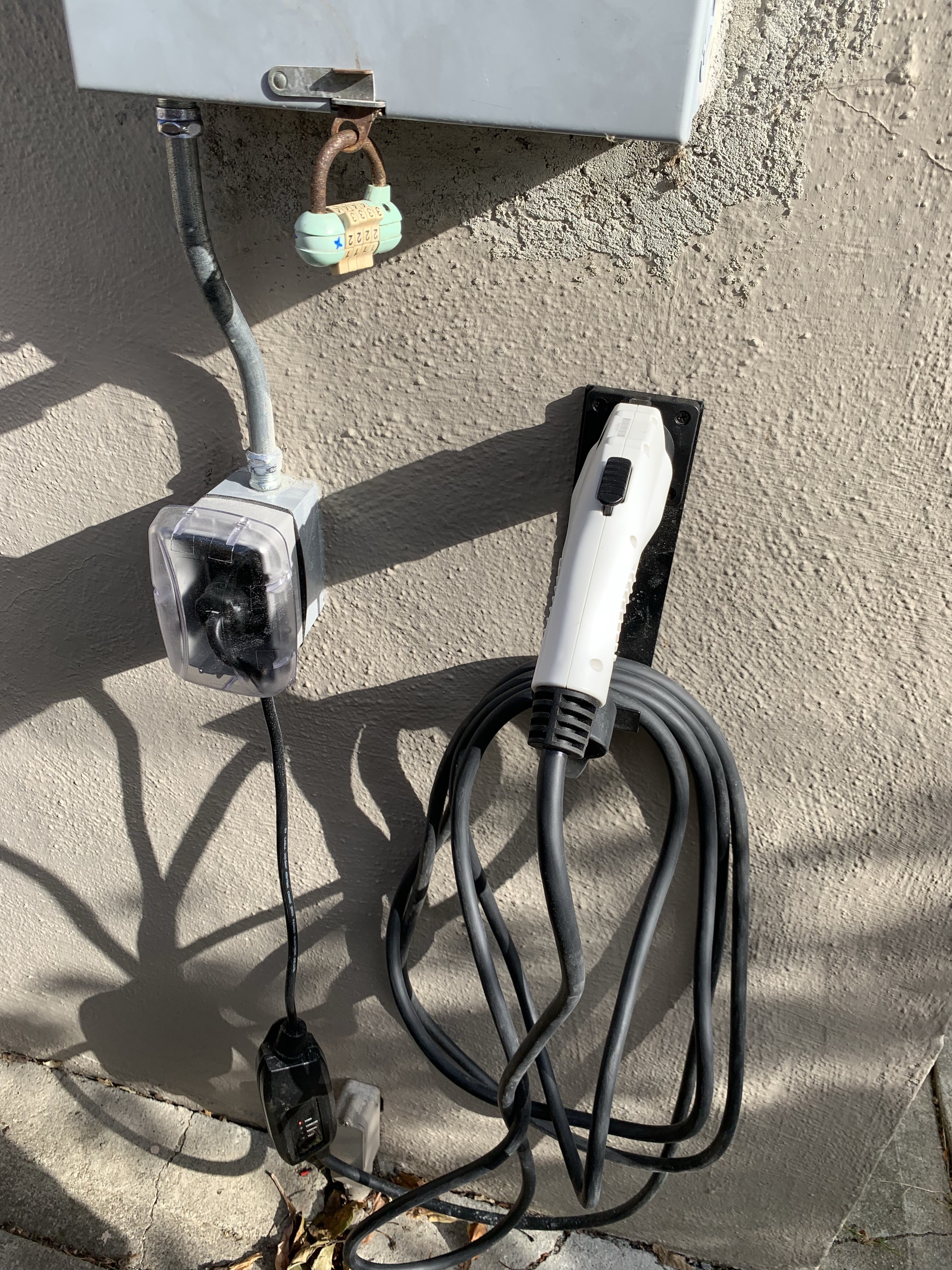
Being able to charge at home overnight is perhaps the most radical transformation of all. Your house is now a "gas station". Our Kia Niro has a range of about 250 miles on a full battery. With any modern electric car, provided you drive less than 200 miles a day round trip (who even drives this much?), it's very unlikely you'll ever need to "fill the tank" anywhere but at home. Ever. It's so strange to think that in 50 years, gas stations may eventually be as odd to see in public as telephone booths now are. Our charger is, conveniently enough, right next to the driveway since that's where the power breaker box was. With the level 2 charger installed, it literally looks like a gas pump on the side of the house, except this one "pumps" … electrons.
This electric car is such a great experience. It's so much better than our gas powered station wagon that I swear, if there was a fully electric minivan (there isn't) I would literally sell our Honda minivan tomorrow and switch over. Without question. And believe me, I had no plans to sell that vehicle two months ago. The electric car is that much better.
I was expecting "yet another car", but what I got instead was a new, radical worldview. Driving a car powered by barely controlled liquid fuel detonations used to be normal. But in an world of more and more viable electric vehicles this status quo increasingly starts to feel … deeply unnatural. Electric is so much better of an overall experience that you begin to wonder: why did we ever do it that way?
Gas cars seem, for lack of a better word, obsolete.
How did this transformation happen, from my perspective, so suddenly? When exactly did electric cars go from "expensive, experimental thing for crazy people" to "By God, I'll never buy another old fashioned gasoline based car if I can help it"?
I was vaguely aware of the early electric cars. I even remember one coworker circa 2001 who owned a bright neon green Honda Insight. I ignored it all because, like I said, I'm not a car guy. I needed to do the research to understand the history, and I started with the often recommended documentary Who Killed the Electric Car?
This is mostly about the original highly experimental General Motors EV1 from 1996 to 1999. It's so early the first models had lead-acid batteries! 😱 There's a number of conspiracy theories floated in the video, but I think the simple answer to the implied question in the title is straight up price. The battery tech was nowhere near ready, and per the Wikipedia article the estimated actual cost of the car was somewhere between $100,000 and $250,000 though I suspect it was much closer to the latter. It is interesting to note how much the owners (well, leasers) loved their EV1s. Having gone through that same conversion myself, I empathize!
I then watched the sequel, Revenge of the Electric Car. This one is essential, because it covers the dawn of the modern electric car we have today.
This chronicles the creation of three very influential early electric cars — the Nissan Leaf, the Chevy Volt, and of course the Tesla Roadster from 2005 - 2008. The precise moment that Lithium-Ion batteries were in play – that's when electric cars started to become viable. Every one of these three electric cars was well conceived and made it to market in volume, though not without significant challenges, both internal and external. None of them were perfect electric vehicles by any means: the Roadster was $100k, the Leaf had limited range, and the Volt was still technically a hybrid, albeit only using the gasoline engine to charge the battery.
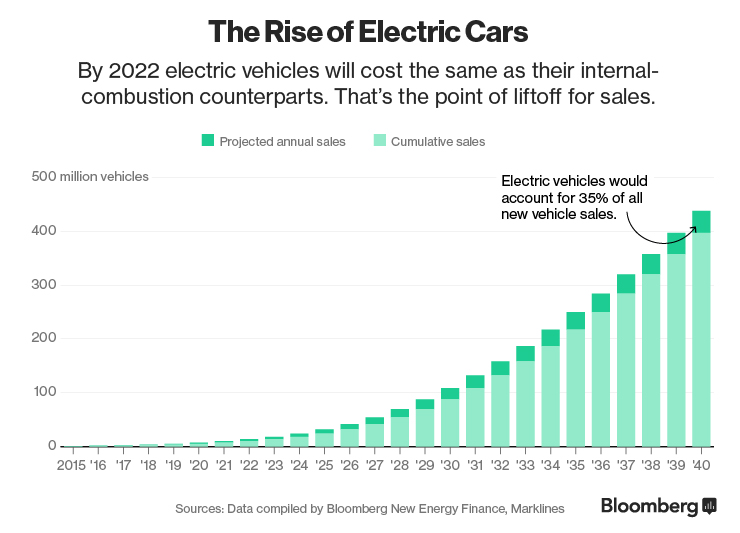
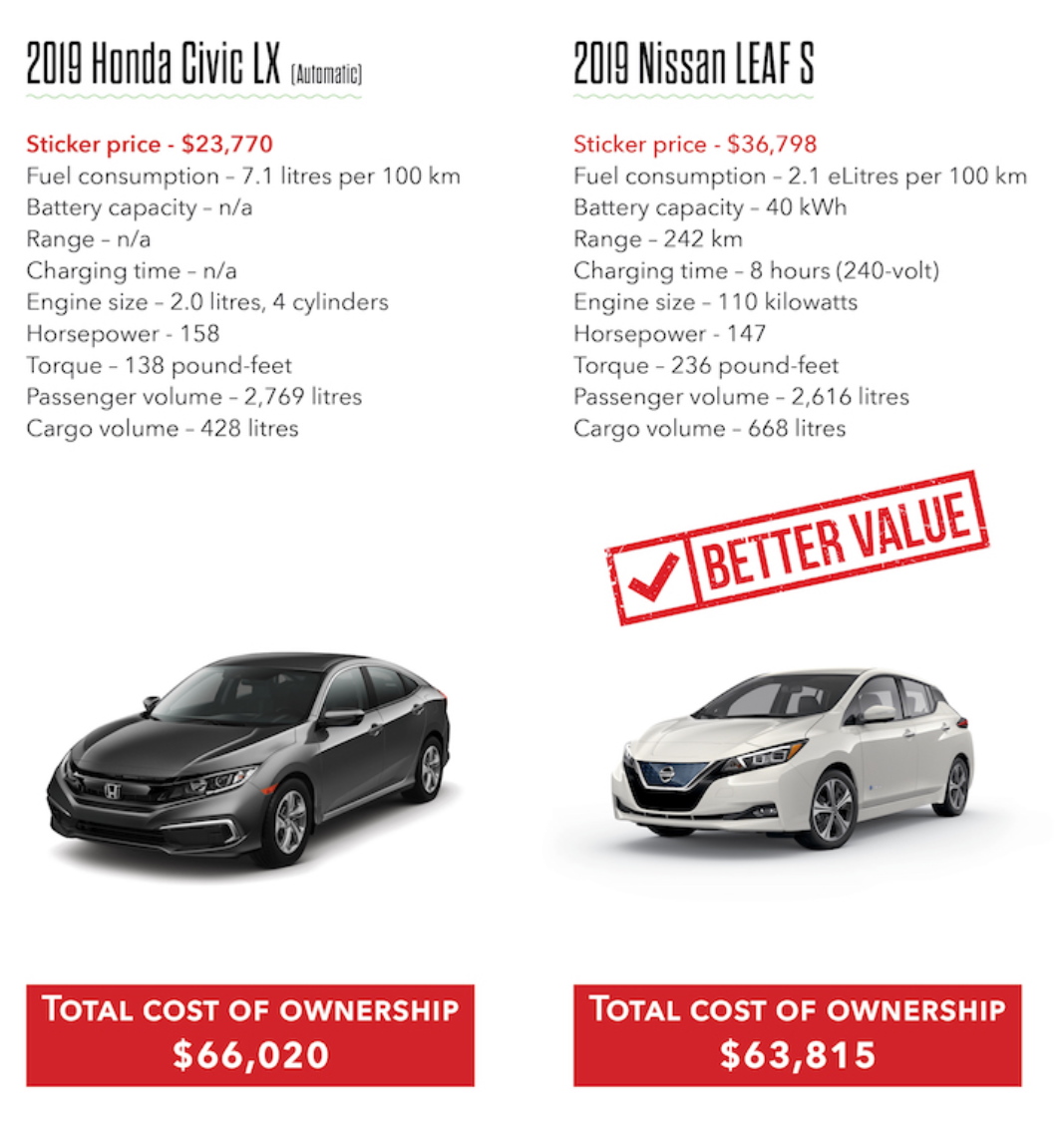
Ten years later, Tesla has the model 3 at $38,000 and we bought our Kia Niro for about the same price. After national and state tax incentives and rebates, that puts the price at around $30,000. It's not as cheap as it needs to be … yet. But it's getting there. And it's already competitive with gasoline vehicles in 2019.
It's still early, but the trend lines are clear. And I'm here to tell you that right now, today, I'd buy any modern electric car over a gasoline powered car.
If you too are intrigued by the idea of owning an electric car, you should be. It's freaking awesome! Bring your skepticism, as always; I highly recommend the above Matt Ferrell explainer video on electric vehicle myths.
As for me, I have seen the future, and it is absolutely, inexorably, and unavoidably … electric. ⚡
https://ift.tt/eA8V8J Yesterday I was surprised to see a big advertisement banner displaying on Lock Screen in one of my Samsung Galaxy smartphones....
TrendLabs Security Intelligence has notified of 85 apps on the Google Play Store that are ridden with adware in its new discovery published three days earlier on August 16th, 2019. These apps are used for everyday activities such as photography and gaming, the research points out. These ads laden apps are supposedly thought as a nuisance by users, but they have several motives behind which remain strange to users usually downloading them.
According to their research, as many as 8 million downloads had been made of these adware laden apps by the time they revealed the information, the research warns as it hides as malware in the device of the user, and starts showing unwanted advertisements.
“Apart from displaying advertisements that are difficult to close, it employs unique techniques to evade detection through user behavior and time-based triggers,” the original research by the security intelligence reads while describing the techniques by which these apps penetrate into any device without causing any serious risk to themselves.
By using Java reflection, an API that enables the runtime behavior of the app to be examined or changed, the malicious software enters the device after determining if the ad-ridden app has been installed for almost thirty minutes. Once it finds out, the app’s shortcut is created itself on the home screen of the device after hiding its icon, preventing the app from being uninstalled.
Through their violations, they can even check that for how long the device has been unlocked, and for how long the particular app has been installed in the device. With the exception of all that, it can also see which advertisement was played earlier, so that it doesn’t show any ad too often.
As these ads ridden apps do perform their usual functions of capturing photos and playing games, users are bound to watch the full advertisement before they can either return to the app or close it anyhow. The Security Intelligence has forwarded the details of these ad-ridden apps, and according to the published article on their website, they are not available on Google Play Store anymore. But the damage that these apps have done to millions of devices and users is not something to be left unaddressed.
What should you do if you’ve been the victim of these apps
Trend Micro in its article has published some of the tips that people, who are already affected by such apps, can avail to get rid of them. Recent Samsung android devices have a feature that restricts the creation of shortcut on the home screen, the research highlights, suggesting users of taking full advantage of it to uninstall the app. It also reminds users of the function that the android 8 or later versions have of asking for user’s confirmation before an application is allowed to create a shortcut on the home screen of the device.
In addition to this, an ethical hacker named John Opdenakker proposes that users should read the app review before installing them, just as its done when someone buys an item on Amazon.
Great pain of trying any makeup product while watching the video tutorial is something that annoys too much. You have to pause, replay, skip forward and backward, and do so forth with the playback of the video-wasting your long time-still feeling unsatisfied. After having spent many hours, reaching a final conclusion of choosing any of the used cosmetics is another difficulty.
Keeping in view these snags, FameBit, Branded Content Division of Youtube had conducted several trials with lipsticks shades on iOS and found that 30% of viewers actually activated AR experiences, and spent more than eighty seconds applying them. Subsequently, Aaron Luber, (head of branded Experiences, AR, and VR) had announced earlier in June this year the coming of AR beauty try-on feature in immersive branded experiences in the YouTube app, that would help consumers try-on virtual makeup products themselves during any tutorial or Vlog.
In its new update, Youtube has finally gone live with this feature of its own sort. MAC Cosmetics, one of the world’s leading makeup brands is the first one to have joined in with the app to initiate AR Beauty Try-on Feature.
“We’re so excited to see MAC’s artistry and innovation come to life in this uniquely digital way. Being able to bring our newest lip shades to consumers through FameBit AR Beauty Try-on is a pioneering step, fusing the experience of content viewing and shopping,” said MAC Cosmetics North America SVP/GM Constantin Sklavenitis in a statement.
They’ve partnered with one of the world’s prominent beauty artists Roxette Arisa on the launch of their product – Love Me Lipstick Collection.
“The coolest part about this video is that you guys are actually going to be able to try on the lipsticks with me,” she chuckles and adds “like virtually”.
“Honestly I am very honored to be the part of this, because like I said, not only it’s one of my favorite brands, but also it’s like just a super cool project, and I hope you guys are also gonna like it,” she says, showing her excitement before starting the video tutorial.
How can you use it?
Before anything, you need to be sure that you are watching this video tutorial on your phone. Then make sure that you have the latest update of the YouTube app installed, otherwise the feature won’t appear. Now turn your device vertically, and while watching the video, you will see “Try it on” button, which will launch the camera in a split-screen view. Tap it to go ahead. Now you can scroll through all shades of lipsticks present, and try different colors to check which of them looks pretty with your face.
Youtube indeed is not the first digital app to have launched such a feature, there are many other websites and social media platforms already having provided this break. But Youtube is widely regarded for thousands of videos uploaded every day, bringing this option means the generation of amazing revenue mutually. After MAC Cosmetics, many other makeup products are likely to join in to improve their quality and products.
https://ift.tt/eA8V8J PROBLEM SYMPTOM: I have received emails from readers that suddenly Mozilla Firefox browser started showing SSL/TLS/certificate errors and warning messages on...
Google Maps, an app familiar to millions of smartphone users around the world for navigation, in its new 8th August update has introduced some new and exciting features for its users. Among them are the introduction of Live View, the addition of Reservations Tab, a dedicated option to let you know about nearby food outlets, and updated timeline to remember the places you visited if the location history setting of your device is turned on.
One of the long-anticipated features called Live View has left an obvious impact and is tremendously welcomed everywhere due to its expansive technological mechanics. Live View will be using Augmented Reality to find directions for its users more accurately and without any kind of a minute hindrance in their navigation from one point to another. Users will be able to find the desired station or spot of their choice after identifying landmarks being shown on the screen of their phones.
The feature had been issued earlier this year on Google’s Pixel phones after being tested out last year, whereas now it is being tested profusely on more smartphones as a beta feature to enrich the app’s functions and experience. With this new testing feature, virtual arrows and directions are positioned exactly in the real world for people to touch down their accurate destination without any uncompromising obstacle in their way.
The function adds on to the app as it’s being updated on devices across the world. People with Android and iOS devices supporting ARCore and ARKit respectively can tryout Google Maps’ Live View themselves. The feature will be usable in those countries where the street view is available.
How does Google Maps Live View work?
To use Live View, open the Google Maps app on your device, and enter your desired destination in the search bar. Indicate that you are intent on walking, and then, you will hold your phone in the air to capture your surroundings like a viewfinder from its camera after tapping the “Start AR” button when it appears on the screen of your device.
In addition to this, the application has launched a couple of other new features for a better experience for its users in its new update. Now you can see your hotel and flight reservations easily while either you are on your way to your destination, or stuck somewhere before checking in.
Furthermore, you can also find wonderful local food in your vicinities, and book a table in advance if the place is fully packed with people, or in demand at the time of your visit.
https://ift.tt/eA8V8J Today I received following message on my mobile phone: Dear Customer, As per Govt of India's Cyber Swachhta Project, your device...
https://ift.tt/eA8V8J NOTE: This article is updated whenever some new and interesting features are introduced in Nightly builds of Mozilla Firefox web browser....
https://ift.tt/eA8V8J Recently an AskVG reader "Alina" asked me about this issue. She was having an annoying problem in Windows 10 operating system....
Where modern technology has curtailed almost all walls of antiquity and made our lives much easier; baby nursing is not something left uncovered. Parents, usually moms, purchase baby monitor devices to keep a watchful eye on their toddlers for bridging this gap while they are away doing something else, or if the baby is asleep.
A good baby monitor device can cost anywhere between $150-250, which is quite a lot. If you are not ready to make such an investment right now, then you can also turn your Android phone into a fully equipped baby monitor. This can be done with a baby monitor Android app, and if you are up for it; then I bring you 3 of the best baby monitor Android apps below.
It’s the best app with its reliable features partaking in caring about your child when you are out somewhere. It includes almost all audio functions that a hardware baby monitor normally performs along with the feature of video streaming as well. And even if in a hurry you couldn’t place the phone around your baby accurately, the microphone of the device with your baby would configure and adjust microphone settings itself.
You can also pare many devices at the same time if there are many family members taking care of your baby. You can be notified of any missed call or text message arrives at your baby’s phone and also when the connection with your baby’s device is lost anyhow; hence with its extraordinary smart features, you can be in touch with your baby easily.
The app works in the background even if the screen of your phone is off. The app allows free check on your baby for 4 hours per month. For unlimited usage, you’ll have to upgrade to premium version costing $4.99/year or $8.99 for lifetime access.
It’s the best app for parenting I can say lest you want organized things around you every time. Without extra whistles and tones, the app turns your device into a baby alarm with customizable sensitivity and alerts you with a call or text message if your baby feels restless or starts crying during his sleep.
If your alarm is triggered, its image surveillance option lets you know about your baby by taking and sending the snap of your baby to your phone. With its additional features, you can also take notes to examine your baby sleeping-time, and get useful tips to get your baby to sleep as well. Overall, it’s a simple baby monitoring app that gets the job done without any fuss. The app is completely free to use, but you’ll have to deal with ads.
Alfred Home Security Camera is basically a normal live surveillance app and video footage recorder; allowing you to take care of your loved ones, and safeguarding crimes such as theft and illegitimate intrusion anywhere. However, its features are sufficient to be used as a free monitor for your baby with any spare device.
Just install the app, pare both devices, and place it around your baby to monitor him wherever you are. The app will keep you informed about every action of your baby with motion sensors and instant alerts. You can also assure your presence around your baby by talking to him through its walky-talky feature. And in case you notice a cute move of your baby, the app does allow you to have a video captured, and you can save, stream, and download it without any kind of trouble.
Ending thoughts
Even though there are hundreds of baby monitor apps, I’ve taken out the best apps for you to make sure that you can show good parenthood, and your baby is well taken care of! Alfred and Baby Monitor by MVA are good simple and free apps that should work fine for most parents. However, Dromi is the all-around best option if you are willing to pay a few dollars for unlimited monitoring. Let me know below in the comment box which of these apps you like the most.
Although standard links work fine for linking to your business landing page while emailing a potential client. However, if you want to increase your conversions, then hyperlinking an important image would be much more fruitful. People tend to be attracted more by a call-to-action image than a dull link.
If you are interested in hyperlinking an image in your emails, then I got you covered. In today’s post, I’ll show you how you can add a link to an image in Gmail emails.
Hyperlink an image in Gmail
You don’t need a third-party app to achieve this, but it does require some tricky instructions are needed to be followed exactly. Make sure you follow the below instructions as it is because some of the steps have similar options that could mess up the process.
Step #1: First, open up the compose window in Gmail from the “Compose” button at the top-left corner.
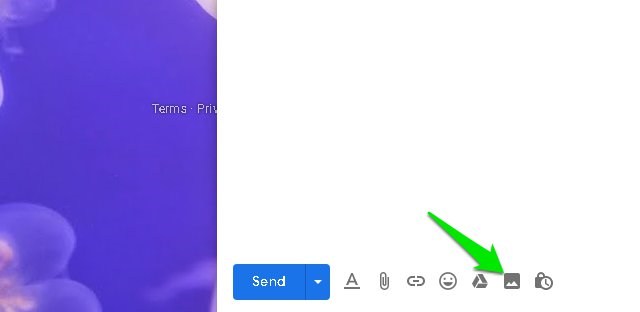
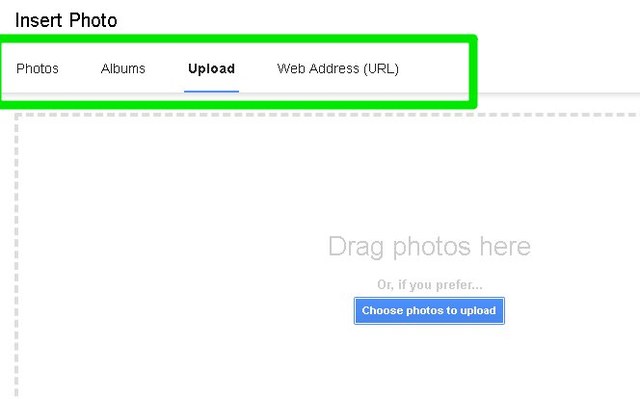
Step #2: Here move to the email body area and click on the “Insert photo” option at the bottom. Make sure you use Insert photo option to add the image, images uploaded through Attach files option can’t be hyperlinked.
Step #3: You’ll find multiple options to add a photo, including URL, Google Drive, and upload from the PC. Use any option to select the photo and click on “Insert” to add it in the email body.
Step #4: Now you must highlight the image. While the image is still unselected, left-click on it, hold the click, and then drag a little until the whole image turns blue in color. Afterward, click on the “Insert link” button at the bottom or use the Ctrl+K keyboard shortcut.
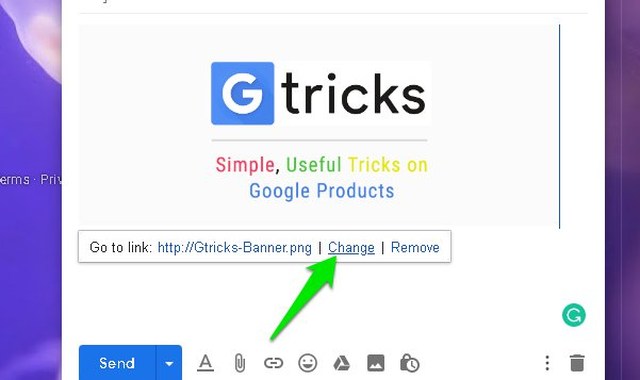
Step #5: Click on the “Change” button next to the current hyperlink of the image.
Step #6: Here replace the image link with whatever link you want and click on “OK”.
That’s it, the link will be added to the image and any recipient can just click on the image to go to the link destination.
Tip: You can also use the above process to hyperlink your email signature image if you are using one. For example, if you have your company logo in your Gmail signature, then you can hyperlink it with your company’s website home page for direct access. While creating an image-based signature, simply use the above instructions to hyperlink the uploaded signature image.
To conclude
If you have precisely followed the instructions as mentioned, then hyperlinking the image shouldn’t have been difficult. I know some users may get confused with attach files and insert photo options, as both can upload and send the photo. Furthermore, there is also a difference between highlighting and selecting an image, make sure you highlight the image for hyperlinking.
How will you be using this little neat trick to make images interactive? Do share with us in the comments below.